AddTab Method
Description
Adds a Tab to the Backstage View's Tab Pane.
Syntax
Public Function AddTab( _
    ByVal [Id](#) As Long, _
    ByVal [Caption](#) As String, _
    ByVal [ControlPaneHwnd](#) As Integer _
) As [RibbonBackstageTab](XtremeCommandBars~RibbonBackstageTab.md)
Parameters
- Id: Id of the Tab.
- Caption: Caption of the Tab.
- ControlPaneHwnd: Handle to the object to display in the Control Pane when the tab is clicked.
Return Type
Reference to the RibbonBackstageTab that was added.
Remarks
AddTab will add a Tab to the Backstage View's Tab Pane. Tabs are used to display controls (such as forms containing BackstageButton controls) in the Control Pane when the tab is clicked.
Note:
The handle attached to the Tab should be a form or some container object that will contain the contents of the Control Pane and Optional Control Pane.
Important:
If you choose to use the backstage, Microsoft requires that AT LEAST 1 tab is added to the Tab Pane (Commands are optional) and the FIRST tab MUST ALWAYS be selected when the backstage is displayed, regardless of any previous selections or settings.
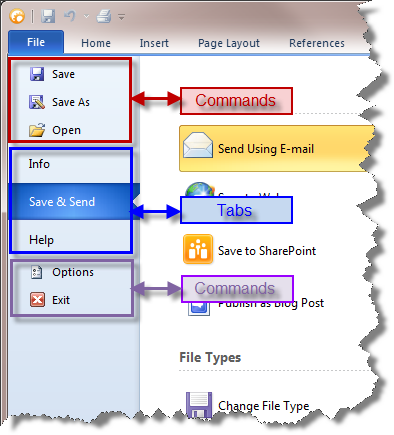
Example
Dim RibbonBar As RibbonBar
Set RibbonBar = CommandBars.ActiveMenuBar

Dim BackstageView As RibbonBackstageView
Set BackstageView = CommandBars.CreateCommandBar("CXTPRibbonBackstageView")

Set RibbonBar.AddSystemButton.CommandBar = BackstageView

BackstageView.AddCommand ID_FILE_SAVE, "Save"
BackstageView.AddCommand ID_FILE_SAVE_AS, "Save As"
BackstageView.AddCommand ID_FILE_OPEN, "Open"
BackstageView.AddCommand ID_FILE_CLOSE, "Close"

If (pageBackstageInfo Is Nothing) Then Set pageBackstageInfo = New pageBackstageInfo
If (pageBackstageSend Is Nothing) Then Set pageBackstageSend = New pageBackstageSend
If (pageBackstageHelp Is Nothing) Then Set pageBackstageHelp = New pageBackstageHelp

Dim ControlInfo As RibbonBackstageTab
Set ControlInfo = BackstageView.AddTab(1000, "Info", pageBackstageInfo.hwnd)

BackstageView.AddTab 1002, "Save && Send", pageBackstageSend.hwnd
BackstageView.AddTab 1001, "Help", pageBackstageHelp.hwnd

BackstageView.AddCommand ID_FILE_OPTIONS, "Options"
BackstageView.AddCommand ID_APP_EXIT, "Exit"

ControlInfo.DefaultItem = True

CommandBars.Icons.LoadBitmap App.Path & "\res\BackstageIcons.png", _
    Array(ID_FILE_SAVE, ID_FILE_SAVE_AS, ID_FILE_OPEN, ID_FILE_CLOSE, ID_FILE_OPTIONS, ID_APP_EXIT), xtpImageNormal
See Also
Copyright (c) 1998-2024 Codejock Technologies. All rights reserved.