RibbonBackstageTab Object
Description
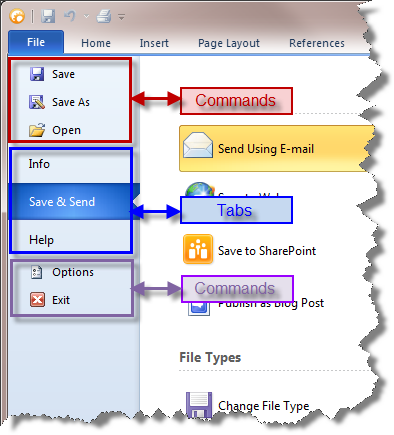
Represents a Tab to use in the Backstage View's Tab Pane.
For a list of all members defined in this module, see RibbonBackstageTab Members.
Object Model






Remarks
Tabs are used to display more commands related to the tab in the Control Pane. Additionally, more related commands can be displayed in the optional control pane. The method AddTab will add a Tab to the Backstage View's Tab Pane. Tabs are used to display controls (such as forms containing BackstageButton controls) in the Control Pane when the tab is clicked.
The ControlNotify event is called when a tab in the Backstage has changed.
Private Sub CommandBars_ControlNotify(ByVal Control As XtremeCommandBars.ICommandBarControl, ByVal Code As Long, ByVal NotifyData As Variant, Handled As Variant)
    If (Code = **XTP_BS_TABCHANGED**) Then
        Debug.Print Control.Caption
    End If
End Sub
Note:
The handle attached to the Tab is used to display some object that represents the control pane. This should be a form or some container object that will contain the contents of the Control Pane and Optional Control Pane.
For example, you would create a form that contains Backstage Buttons and Backstage Separators to design the control pane and optional control pane. This form is then attached to the Tab when it is added, and when the Tab is clicked, it will display the contents of the attached form.
(At the time of the 15.0 release, this might change in the future.) It is important to note that attached forms in .NET will not have their Form_Load or Form_Activate events called; therefore, you should use the form's constructor to perform those tasks.
Important:
If you choose to use the backstage, Microsoft requires that AT LEAST 1 tab is added to the Tab Pane (Commands are optional) and the FIRST tab MUST ALWAYS be selected when the backstage is displayed, regardless of any previous selections or settings.
See Also
Copyright (c) 1998-2024 Codejock Technologies. All rights reserved.