RibbonBackstageView Object
Description
Represents the Ribbon's backstage view.
For a list of all members defined in this module, see RibbonBackstageView Members.
Object Model









Remarks
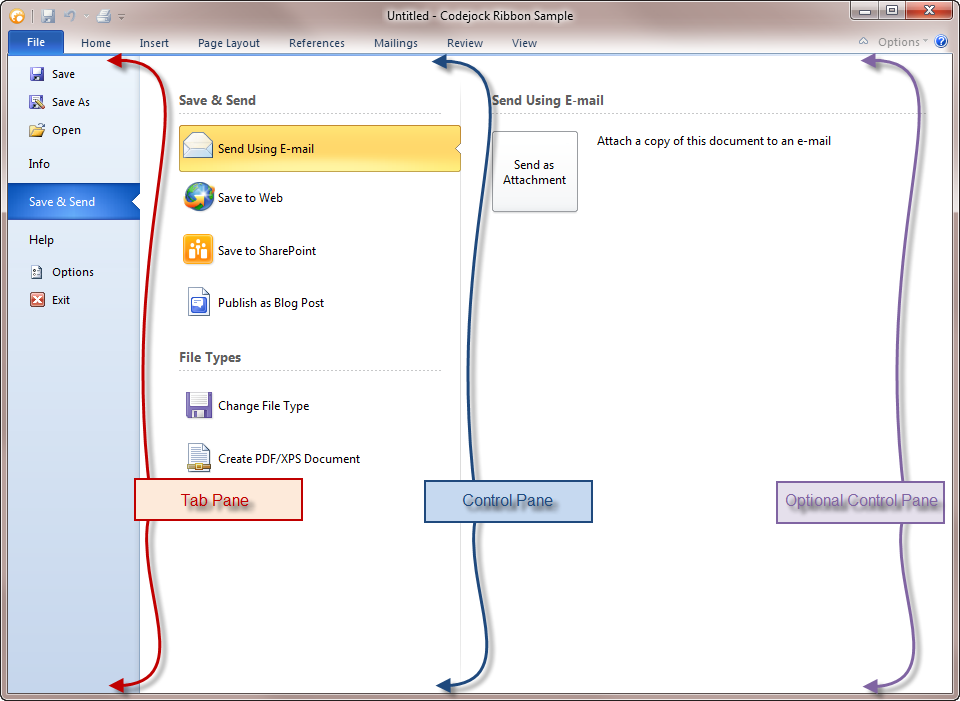
The backstage view is displayed by the ribbon when the system tab is pressed. This is the new MS Office 2010 style menu and is used for displaying tasks that the user can perform on the document (i.e., printing and saving). The backstage view consists of three main sections:
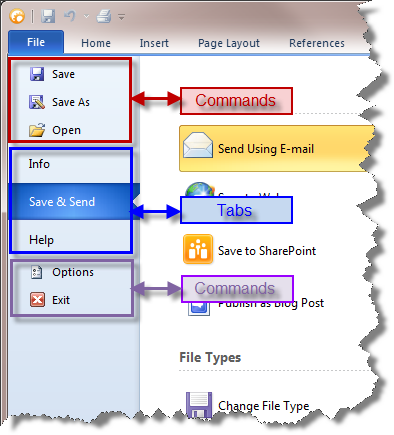
- Tabs Pane: Contains commands and tabs.
- Control Pane: Contains controls related to the tabs in the Tabs Pane.
- Optional Control Pane: Contains controls related to controls in the Control Pane.
When the Backstage View is opened, the InitCommandsPopup event will occur.
Private Sub CommandBars_InitCommandsPopup(ByVal CommandBar As XtremeCommandBars.ICommandBar)
    If TypeOf CommandBar Is RibbonBackstageView Then
        Debug.Print "RibbonBackstageView"
    End If
End Sub
Important:
If you choose to use the backstage, Microsoft requires that at least one tab is added to the Tab Pane (commands are optional) and the first tab must always be selected when the backstage is displayed, regardless of any previous selections or settings.
Additionally, if you choose to use the backstage, you cannot use the 2007 style "circle" application button. You are also required to include commands that perform tasks on the entire document, such as printing and saving. Copy and paste is an example of commands that would not be appropriate for the backstage view.
Example
Dim RibbonBar As RibbonBar
Set RibbonBar = CommandBars.ActiveMenuBar

Dim BackstageView As RibbonBackstageView
Set BackstageView = CommandBars.CreateCommandBar("CXTPRibbonBackstageView")

Set RibbonBar.AddSystemButton.CommandBar = BackstageView

BackstageView.AddCommand ID_FILE_SAVE, "Save"
BackstageView.AddCommand ID_FILE_SAVE_AS, "Save As"
BackstageView.AddCommand ID_FILE_OPEN, "Open"
BackstageView.AddCommand ID_FILE_CLOSE, "Close"

If (pageBackstageInfo Is Nothing) Then Set pageBackstageInfo = New pageBackstageInfo
If (pageBackstageSend Is Nothing) Then Set pageBackstageSend = New pageBackstageSend
If (pageBackstageHelp Is Nothing) Then Set pageBackstageHelp = New pageBackstageHelp

Dim ControlInfo As RibbonBackstageTab
Set ControlInfo = BackstageView.AddTab(1000, "Info", pageBackstageInfo.hwnd)

BackstageView.AddTab 1002, "Save && Send", pageBackstageSend.hwnd
BackstageView.AddTab 1001, "Help", pageBackstageHelp.hwnd

BackstageView.AddCommand ID_FILE_OPTIONS, "Options"
BackstageView.AddCommand ID_APP_EXIT, "Exit"

ControlInfo.DefaultItem = True

CommandBars.Icons.LoadBitmap App.Path & "\res\BackstageIcons.png", _
    Array(ID_FILE_SAVE, ID_FILE_SAVE_AS, ID_FILE_OPEN, ID_FILE_CLOSE, ID_FILE_OPTIONS, ID_APP_EXIT), xtpImageNormal
See Also
Copyright (c) 1998-2024 Codejock Technologies. All rights reserved.