Items Property
Description
Collection of CommandBarGalleryItem objects that have been added to this gallery.
Property Type
Read-write property
Syntax (Visual Basic)
Public Property Items() As [CommandBarGalleryItems](XtremeCommandBars~CommandBarGalleryItems.md)
Remarks
Before adding items to a gallery, the CreateGalleryItems method must be used to create a CommandBarGalleryItems collection. Note that the Id of the CommandBarGalleryItems collection must use the same Id as the gallery control. See the example below.
The Items collection allows you to access, add, modify, and delete the items in a gallery. The AddItem and AddLabel methods are used to add items to a gallery.
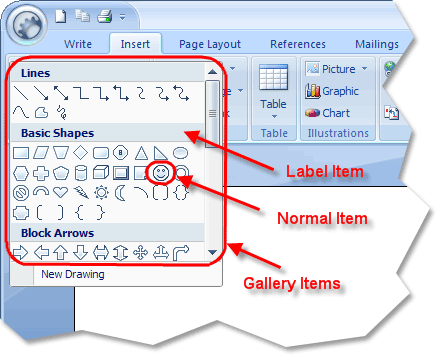
The illustration below shows a gallery control which contains both label and normal gallery items.
Example
Adding Items to a Gallery (Visual Basic)
This sample illustrates how to add items to a gallery.
Dim ComboPopup As CommandBar, GalleryFont As CommandBarGallery, ItemsFont As CommandBarGalleryItems
Dim GallerySize As CommandBarGallery, ItemsSize As CommandBarGalleryItems

Set ComboPopup = CommandBars.Add("Combo Popup", xtpBarComboBoxGalleryPopup)

Set GalleryFont = ComboPopup.Controls.Add(xtpControlGallery, ID_FONT_FACE, "")
GalleryFont.Width = 290
GalleryFont.Height = 508

' First create a CommandBarGalleryItems collection using the
' same Id as the gallery does
Set ItemsFont = CommandBars.CreateGalleryItems(ID_FONT_FACE)
ItemsFont.ItemWidth = 0
ItemsFont.ItemHeight = 26

ItemsFont.AddLabel "Recently Used Fonts"
ItemsFont.AddItem 1, "Arial"
ItemsFont.AddItem 2, "Tahoma"

ItemsFont.AddLabel "All Fonts"
For i = 1 To Screen.FontCount
    ItemsFont.AddItem i, Screen.Fonts(i)
Next i

' Now set the Gallery.Items collection to the ItemsFont collections
' that contains the gallery items
Set GalleryFont.Items = ItemsFont
Set Combo.CommandBar = ComboPopup
See Also
- CommandBarGallery Object
- AddItem Method
- AddLabel Method
- DeleteAll Method
- DeleteAt Method
- CreateGalleryItems Method
Copyright (c) 1998-2024 Codejock Technologies. All rights reserved.