AddLabel Method
Description
Adds a label item to the Items collection.
Syntax
Public Function AddLabel( _
    ByVal [Caption](#) As String _
) As [CommandBarGalleryItem](XtremeCommandBars~CommandBarGalleryItem.md)
Parameters
- Caption: Text string to display in the label item.
Return Type
Returns a reference to the label CommandBarGalleryItem that was added to the Items collection.
Remarks
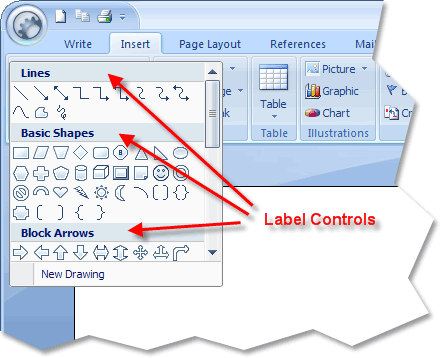
Label controls are added using the AddLabel method. Labels are used to organize/group the items in the gallery. The ShowLabels method will hide or show labels that have been added to the gallery.
Label items cannot display icons, so the ImageIndex property will not be used for a Label item.
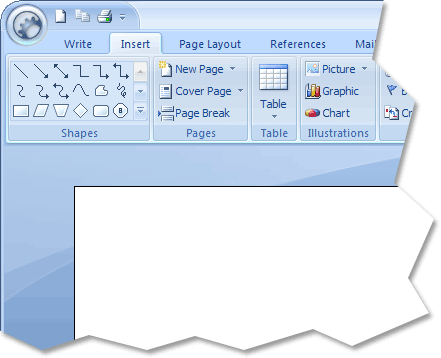
It is common to use the same collection of CommandBarGalleryItems for multiple galleries. For example, you might display the same gallery in both the toolbar and as a popup so the entire gallery can be viewed. When a gallery is displayed in a toolbar, labels are not normally displayed, but when displaying all the items in a gallery, as you might in a popup, the labels should be shown.
The diagram below illustrates a gallery that has been added to a popup and is displaying label controls.
The diagram below shows a gallery added to a normal toolbar that is using the same collection of CommandBarGalleryItems as the diagram above, only the labels are hidden so you can see more items.
See Also
Copyright (c) 1998-2024 Codejock Technologies. All rights reserved.