StackHeight Property
Description
Gets/sets the height of the "stacks" for this series. This is used to make a 100% stacked style chart.
Property Type
Read-write property
Syntax (Visual Basic)
Public Property StackHeight() As Double
Return Type
Returns the stack height for the series.
Remarks
StackHeight is used to make a 100% stacked chart, but can be set to 80, for example. The chart will use the lowest value that a series has set and ignore all larger values. Setting StackHeight for any series will make all other series use this setting, so only use it if you want to have a "100%" stacked bar/area chart.
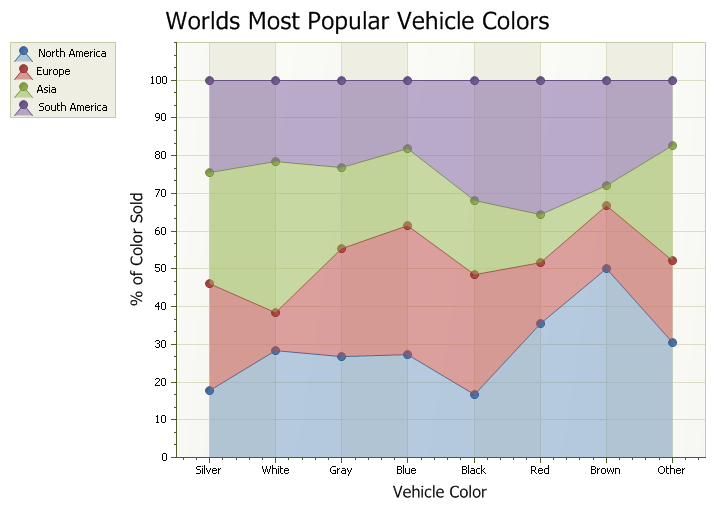
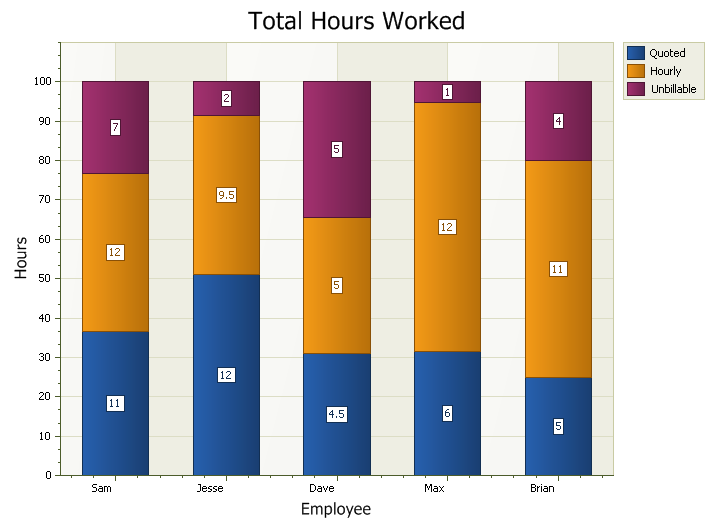
The diagrams below show a stacked area and stacked bar chart.
Example
Sample to show how to use StackHeight to create a 100% Stacked Area chart:
Set ChartControl.Content.Series(3).Style = New ChartStackedAreaSeriesStyle
Set ChartControl.Content.Series(2).Style = New ChartStackedAreaSeriesStyle
Set ChartControl.Content.Series(1).Style = New ChartStackedAreaSeriesStyle
Set ChartControl.Content.Series(0).Style = New ChartStackedAreaSeriesStyle

ChartControl.Content.Series(0).Style.StackHeight = 100
ChartControl.Content.Series(1).Style.StackHeight = 100
ChartControl.Content.Series(2).Style.StackHeight = 100
ChartControl.Content.Series(3).Style.StackHeight = 100
See Also
Copyright (c) 1998-2024 Codejock Technologies. All rights reserved.