BlockSelectionMode Property
Description
Specifies whether block selection was used to select text by holding the Alt key when selecting text. Block selection can also be enabled programmatically.
Property Type
Read-write property
Syntax (Visual Basic)
Public Property BlockSelectionMode() As Boolean
Remarks
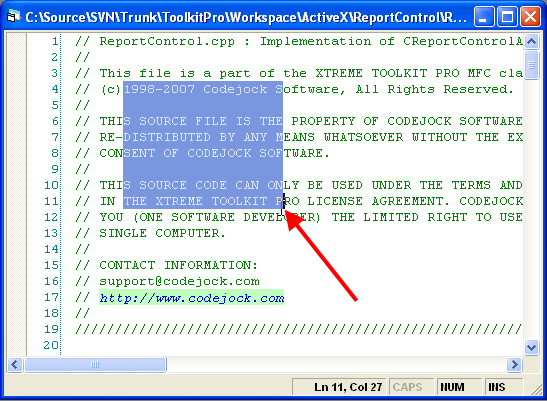
BlockSelectionMode allows square or rectangular blocks of text to be selected.
By default, when holding down the 'Alt' key while selecting text, Block Selection mode will be used. BlockSelectionMode can then be checked to see if the selected text was selected using Block Selection mode.
If BlockSelectionMode is activated in code, it should be done in an event such as MouseDown, as the mouse must be pressed to activate this mode. This allows you to use a switch or button to activate Block Selection mode.
You can set the Start and End properties to define the selection (to highlight part of the text). If Start == End, then the selection is empty.
The illustration below shows some text selected using Block Selection mode.
See Also
Copyright (c) 1998-2024 Codejock Technologies. All rights reserved.