PropertyGridItem Object
See Also
- PropertyGridItem Members
- Categories Property
- Childs Property
- AddChildItem Method
- AddChildItemBinded Method

Description
The PropertyGridItem object represents an item in the Property Grid.
For a list of all members defined in this module, see PropertyGridItem Members.
Object Model














Remarks
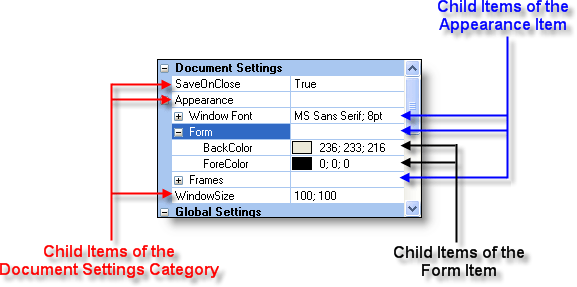
The Property Grid consists of a collection of Categories. Each category contains child items. The child items can have child items, etc., creating a hierarchical list of items. Both the Categories and Child Items are of type PropertyGridItem.
A PropertyGridItem can be of type PropertyItemType such as BOOL, Date, Font, Color, String, Number, Double, Picture, Enum, EnumFlags, or Category.
The picture below illustrates a PropertyGridItem of type Category that has three child items. The Appearance child item has three of its own child items. Each of the child items of the Appearance item has their own child items.
Example
Adding Items to the Property Grid (Visual Basic)
This sample illustrates how to add a hierarchical list of items to the Property Grid.
Dim Category As PropertyGridItem, ItemAppearance As PropertyGridItem
Dim FontAppearance As PropertyGridItem, FormAppearance As PropertyGridItem, FrameAppearance As PropertyGridItem
Dim Item As PropertyGridItem

' Adds a category to the Property Grid.
Set Category = wndPropertyGrid.AddCategory("Document Settings")

' Adds a child item with caption "SaveOnClose" to the "Document Settings" category.
Set Item = Category.AddChildItem(PropertyItemBool, "SaveOnClose", True)

' Adds a child item with caption "Appearance" to the "Document Settings" category.
Set ItemAppearance = Category.AddChildItem(PropertyItemString, "Appearance", "")

    ' Adds a child item with caption "Window Font" to the "Appearance" item.
    Set FontAppearance = ItemAppearance.AddChildItem(PropertyItemFont, "Window Font", Me.Font)

        ' Adds six child items to the "Windows Font" item.
        FontAppearance.AddChildItem PropertyItemBool, "Bold", Me.Font.Bold
        FontAppearance.AddChildItem PropertyItemBool, "Italic", Me.Font.Italic
        FontAppearance.AddChildItem PropertyItemBool, "Underline", Me.Font.Underline
        FontAppearance.AddChildItem PropertyItemBool, "Strikethrough", Me.Font.Strikethrough
        FontAppearance.AddChildItem PropertyItemString, "Name", Me.Font.Name
        FontAppearance.AddChildItem PropertyItemNumber, "Weight", Me.Font.Weight

' Adds a child item with caption "Frames" to the "Appearance" item.
Set FrameAppearance = ItemAppearance.AddChildItem(PropertyItemString, "Frames", "")

    ' Adds two child items to the "Frames" item.
    FrameAppearance.AddChildItem PropertyItemColor, "BackGround", Me.BackColor
    FrameAppearance.AddChildItem PropertyItemColor, "ForeGround", Me.ForeColor

' Adds a child item with caption "WindowSize" to the "Document Settings" category.
Category.AddChildItem PropertyItemString, "WindowSize", "100; 100"

' Expands the "Document Settings" category.
Category.Expanded = True

' Selects the "SaveOnClose" item in the "Document Settings" category.
Item.Selected = True

' Uses the InsertChildItem to add a child item with caption "Form" to the "Appearance" item. The item will be the second
' item in the collection.
Set FormAppearance = ItemAppearance.InsertChildItem(1, PropertyItemString, "Form", "")

    ' Adds two child items to the "Form" item.
    FormAppearance.AddChildItem PropertyItemColor, "BackColor", Me.BackColor
    FormAppearance.AddChildItem PropertyItemColor, "ForeColor", Me.ForeColor
See Also
- PropertyGridItem Members
- Categories Property
- Childs Property
- AddChildItem Method
- AddChildItemBinded Method
Copyright (c) 1998-2024 Codejock Technologies. All rights reserved.