TimeLineMax Property
Description
Gets or sets the maximum value the time line can represent. (Track Control)
Property Type
Read-write property
Syntax (Visual Basic)
Public Property TimeLineMax() As Integer
Return Type
The maximum value the time line can represent.
Remarks
The Time Line can represent any amount of time. Because of this, it is very likely you will not want to view the entire time line in the current view. For example, the time line might represent a 60-minute movie where the time units are in seconds. In that case, the timeline would go from 0 to 3600, where you are likely only wanting to see 60 seconds in full view.
To create the scenario from above, you set the minimum and maximum time line values and the amount of time in the current view (ViewPort).
Setting the Time Line Bounds will set the total length of the time line:
TrackControl.TimeLineMax = 3600
TrackControl.TimeLineMin = 0
This code sets the time line with a range of 0 to 3600 units of time.
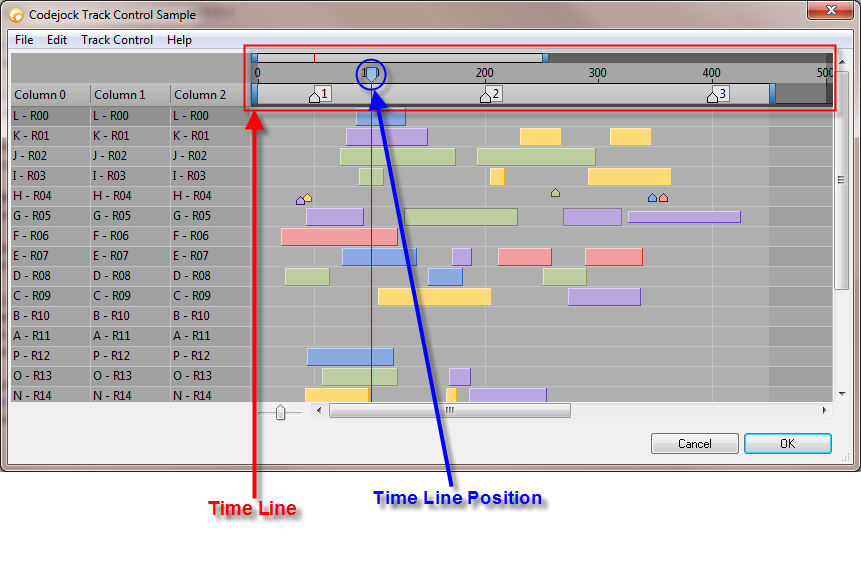
The current position of time in the time line is indicated with the Time Line Position:
TrackControl.TimeLinePosition = 50
The time line position tracker simply shows the current position in time; for example, it can be used to show the current time in a movie playing as it progresses through the track.
Specifying the portion (zoom/scale) of the time line that will be in view, which we call the View Port:
TrackControl.ViewPortMax = 60
TrackControl.ViewPortMin = 0
This code sets the View Port to show only 60 units of time out of the 3600 units of time set above.
Specifies the current work area within the time line. This area has its own scroll bar at the top of the tracks that allows it to be moved as the user desires. The work area is displayed in the shaded area under the work area scroll bar.
TrackControl.WorkAreaMax = 75
TrackControl.WorkAreaMin = 25
This code specifies a work area of 50 units of time. The initial position of the work area will be from 25 units of time to 75 units of time. The user can move this using the scroll bar, as well as adjust the units of time it represents.
See Also
- TrackControl Control
- ViewPortMin Property
- TimeLinePosition Property
- ViewPortMax Property
- ViewPortMin Property
Copyright (c) 1998-2024 Codejock Technologies. All rights reserved.