RightToLeftReading Property
Description
Allows Right-To-Left (RTL) reading order without changing the entire layout of the control (columns order, etc).
Property Type
Read-write property
Syntax (Visual Basic)
Public Property RightToLeftReading() As Boolean
Remarks
All RightToLeftReading does is change the position of symbols in the text from the right side to the left and vice versa. For example, "100$" is displayed when RightToLeftReading is False and "$100" when RightToLeftReading is True.
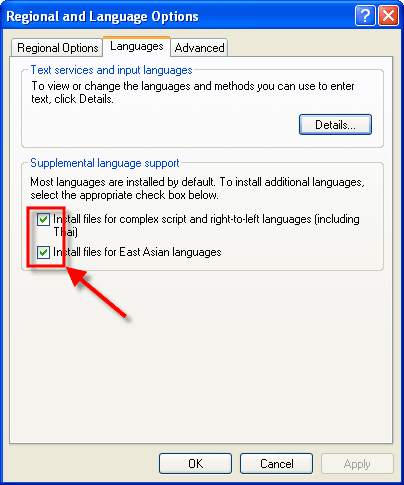
To use RightToLeftReading, RTL reading support must be installed on the computer. To do so, go into the "Regional and Language Options" dialog from the Control Panel. Select the "Languages" tab and make sure the "Install files for complex script and right-to-left languages" and "Install files for East Asian languages" checkboxes are checked.
The picture below is what the "Regional and Language Options" should look like.
RightToLeftReading is set to True when RightToLeft is set to True.
See Also
Copyright (c) 1998-2024 Codejock Technologies. All rights reserved.