DoubleGripper Property
Description
The DoubleGripper property is used to specify whether menu items that are "checked" will have both a check mark and an image next to them in the popup menu.
Property Type
Read-write property
Syntax (Visual Basic)
Public Property DoubleGripper() As Boolean
Remarks
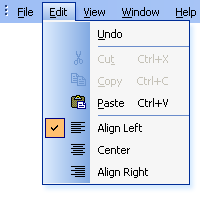
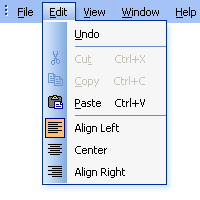
The DoubleGripper property is used to specify whether menu items that are "checked" will have both a check mark and an image next to them in the popup menu. By default, if a menu item has an image and is "checked", then the image of the item will appear highlighted to indicate that it is checked. When using the Double Gripper, both a check mark and the image are displayed side-by-side.
Popup Menu Examples
- Popup Menu using a double gripper: Notice when a menu item is checked, both a check mark and the image are drawn.
- Normal Popup Menu: Notice when a menu item is checked, the image of the item becomes highlighted to indicate the item is checked.
See Also
Copyright (c) 1998-2024 Codejock Technologies. All rights reserved.