AddCommand Method
Description
Adds a command to the Backstage View's Tab Pane.
Syntax
Public Function AddCommand( _
    ByVal [Id](#) As Long, _
    ByVal [Caption](#) As String _
) As [RibbonBackstageCommand](XtremeCommandBars~RibbonBackstageCommand.md)
Parameters
- Id: Id of the command.
- Caption: Caption of the command.
Return Type
Reference to the RibbonBackstageCommand that was added.
Remarks
AddCommand will add a command to the Backstage View's Tab Pane. Commands act just like normal command bar buttons. Use them to perform some action related to the document. Commands are simple buttons; they cannot and should not display any type of popup menu.
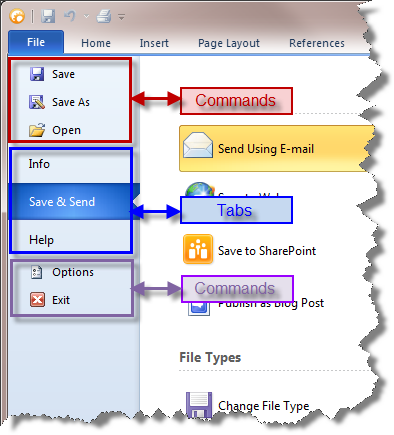
Example
Dim RibbonBar As RibbonBar
Set RibbonBar = CommandBars.ActiveMenuBar

Dim BackstageView As RibbonBackstageView
Set BackstageView = CommandBars.CreateCommandBar("CXTPRibbonBackstageView")

Set RibbonBar.AddSystemButton.CommandBar = BackstageView

BackstageView.AddCommand ID_FILE_SAVE, "Save"
BackstageView.AddCommand ID_FILE_SAVE_AS, "Save As"
BackstageView.AddCommand ID_FILE_OPEN, "Open"
BackstageView.AddCommand ID_FILE_CLOSE, "Close"

If (pageBackstageInfo Is Nothing) Then Set pageBackstageInfo = New pageBackstageInfo
If (pageBackstageSend Is Nothing) Then Set pageBackstageSend = New pageBackstageSend
If (pageBackstageHelp Is Nothing) Then Set pageBackstageHelp = New pageBackstageHelp

Dim ControlInfo As RibbonBackstageTab
Set ControlInfo = BackstageView.AddTab(1000, "Info", pageBackstageInfo.hwnd)

BackstageView.AddTab 1002, "Save && Send", pageBackstageSend.hwnd
BackstageView.AddTab 1001, "Help", pageBackstageHelp.hwnd

BackstageView.AddCommand ID_FILE_OPTIONS, "Options"
BackstageView.AddCommand ID_APP_EXIT, "Exit"

ControlInfo.DefaultItem = True

CommandBars.Icons.LoadBitmap App.Path & "\res\BackstageIcons.png", _
    Array(ID_FILE_SAVE, ID_FILE_SAVE_AS, ID_FILE_OPEN, ID_FILE_CLOSE, ID_FILE_OPTIONS, ID_APP_EXIT), xtpImageNormal
See Also
Copyright (c) 1998-2024 Codejock Technologies. All rights reserved.