PopupContextMenu Method
Description
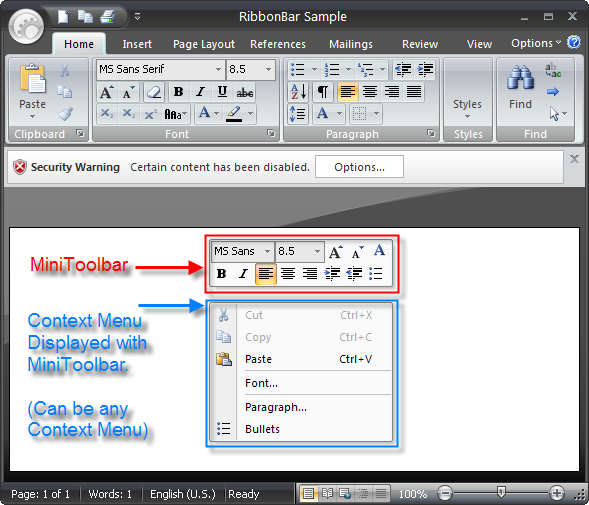
Displays the MiniToolbar without a context menu below.
Syntax
Public Function PopupContextMenu( _
    ByVal PopupBar As CommandBar, _
    Optional ByVal Flags As Variant, _
    Optional ByVal x As Variant, _
    Optional ByVal y As Variant _
) As Long
Parameters
- PopupBar: Reference to a CommandBar to be displayed under the MiniToolbar.
- Flags: (Optional) The TrackPopupFlags of the MiniToolbar.
- x: (Optional) The x-coordinate where the MiniToolbar should be shown.
- y: (Optional) The y-coordinate where the MiniToolbar should be shown.
Remarks
A MiniToolbar can be displayed by itself using PopupMiniToolBar or it can be displayed with a context menu displayed underneath it using PopupContextMenu.
When using PopupContextMenu, a CommandBar object is displayed under the MiniToolbar. Generally, the CommandBar object is one that is stored in the ContextMenus collection. See the supplied sample on how to accomplish this.
See Also
- MiniToolBar Object
- AddPopup Method
- AddMiniToolBar Method
- PopupMiniToolBar Method
- ContextMenus Property
Example
Copyright (c) 1998-2024 Codejock Technologies. All rights reserved.