XTPTabLayoutStyle Enumeration
Description
Specifies how the tabs will be sized within the tabbed workspace.
Members
-
xtpTabLayoutAutoSize
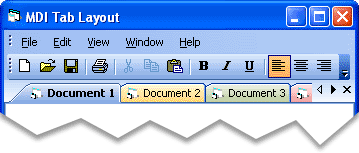
The number of rows is automatically set by the width and number of the tabs. The number of rows can change if the control is resized, which ensures that the tab wraps to the next row. If the layout is not set to xtpTabLayoutMultiRow, and the last tab exceeds the width of the control, left and right arrow buttons are added at the right end of the TabWorkspace. Both the MultiRowFixedSelection and MultiRowJustified properties can be used to further customize how the tabs are displayed when there are multiple rows of tabs. -
xtpTabLayoutSizeToFit
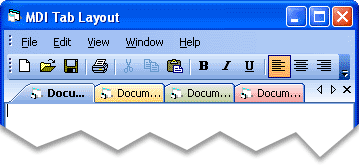
Tabs are sized to fit within the tabbed workspace. All tabs will be compressed into the tabbed workspace. -
xtpTabLayoutFixed
Tabs will be set to a fixed size within the tabbed workspace. -
xtpTabLayoutCompressed
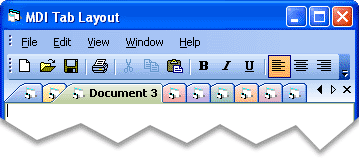
Tabs will be compressed within the tabbed workspace. This will compress all tabs, but all tabs will not be forced into the tabbed workspace. -
xtpTabLayoutMultiRow
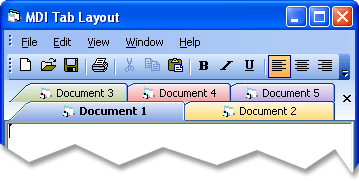
The TabWorkspace can display more than one row of tabs. -
xtpTabLayoutRotated
Tabs will be displayed "rotated" from their natural position. This will cause the caption of the tabs displayed on the top or bottom of the TabWorkspace to be displayed vertically, and tabs displayed on the left or right of the TabWorkspace to be displayed horizontally.
| Member | Description |
|---|---|
| xtpTabLayoutAutoSize | Tabs will be automatically sized within the tabbed workspace. With this flag set, tabs will appear in their normal size. |
| xtpTabLayoutSizeToFit | Tabs are sized to fit within the tabbed workspace. All tabs will be compressed into the tabbed workspace. |
| xtpTabLayoutFixed | Tabs will be set to a fixed size within the tabbed workspace. |
| xtpTabLayoutCompressed | Tabs will be compressed within the tabbed workspace. This will compress all tabs, but all tabs will not be forced into the tabbed workspace. |
| xtpTabLayoutMultiRow | The TabWorkspace can display more than one row of tabs. |
| xtpTabLayoutRotated | Tabs will be displayed "rotated" from their natural position. |
Remarks
xtpTabLayoutAutoSize
xtpTabLayoutCompressed
xtpTabLayoutMultiRow
xtpTabLayoutSizeToFit

xtpTabLayoutFixed
xtpTabLayoutRotated
Example
TabWorkspace Layouts (Visual Basic) - This sample illustrates how to change the various layouts in the TabWorkspace.
' This sample code illustrates how to change the tab workspace to use a Compressed layout.
CommandBars.TabWorkspace.PaintManager.Layout = xtpTabLayoutCompressed

' This sample code illustrates how to change the tab workspace to use a Fixed layout.
CommandBars.TabWorkspace.PaintManager.Layout = xtpTabLayoutFixed

' This sample code illustrates how to change the tab workspace to use a Size-to-Fit layout.
CommandBars.TabWorkspace.PaintManager.Layout = xtpTabLayoutSizeToFit

' This sample code illustrates how to change the tab workspace to use an Autosize layout. This is the default behavior.
CommandBars.TabWorkspace.PaintManager.Layout = xtpTabLayoutAutoSize

' This sample code illustrates how to change the tab workspace to use a multi-row layout.
CommandBars.TabWorkspace.PaintManager.Layout = xtpTabLayoutMultiRow

' This sample code illustrates how to change the tab workspace to use a rotated layout.
' This will cause the caption of the tabs displayed on the top or bottom of the
' TabWorkspace to be displayed vertically, and tabs displayed on the left or right
' of the TabWorkspace to be displayed horizontally.
CommandBars.TabWorkspace.PaintManager.Layout = xtpTabLayoutRotated
See Also
Copyright (c) 1998-2024 Codejock Technologies. All rights reserved.