XTPCommandBarsSpecialCommands Enumeration
Description
Special/Reserved constants used by the CommandBars for control IDs.
Members
-
XTP_ID_RIBBONCONTROLTAB
This ID is passed to the Update event. A control with ID XTP_ID_RIBBONCONTROLTAB will be passed to the Update so you can show, hide, or modify the tabs in the Ribbon's tab control.
This can be used to show/hide the context tab captions in the Ribbon. For example, when you open a JPG file, you can use XTP_ID_RIBBONCONTROLTAB to display some tabs specific to working with JPG files and also add a context tab caption for those tabs. -
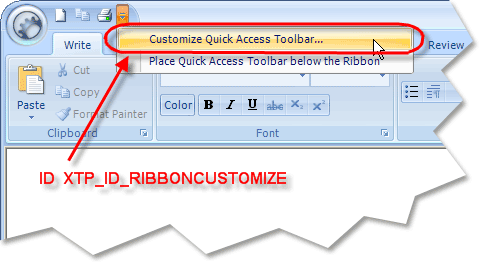
XTP_ID_RIBBONCUSTOMIZE
This ID is used in the Execute event when the CommandBars' "Customize Quick Access Toolbar..." button is pressed. This will not actually display a customize dialog. XTP_ID_RIBBONCUSTOMIZE was added to give you the opportunity to display your own customize dialog. To display the built-in Ribbon Quick Access customize page, you can use the ShowCustomizeDialog method along with the ShowRibbonQuickAccessPage property.
-
XTP_ID_CUSTOMIZE_ADDORREMOVE
This ID is used in the Execute event when the Ribbon's "Add or Remove Buttons" button is pressed. This simply tells you when this button was pressed.
Using the XTP_ID_CUSTOMIZE_ADDORREMOVE ID, you have the opportunity to set your own/localized caption/description by searching for the control with this ID and changing the values. -
XTP_ID_CUSTOMIZE_RESET
This ID is used in an Action to set the text and tooltip for all instances of the reset button in the CommandBars. This is included to help with localization. -
XTP_ID_TOOLBAR_EXPAND
This ID is used in an Action to set the tooltip for all instances of the toolbar expand button that appears at the end of each toolbar. This is included to help with localization. -
XTP_ID_TOOLBAR_HIDE
This ID is used in an Action to set the tooltip for all instances of the 'x' close button on floating toolbars. This is included to help with localization. -
XTP_ID_WORKSPACE_CANCEL
This ID is used in a MDI application for a menu item that will automatically add a menu item for up to 9 open documents. Clicking on one of the menu items will cause the document to come into focus. -
XTP_ID_WINDOWLIST
This ID is for a menu item that will automatically display a list of all the toolbars so that they can be hidden or shown. -
XTP_ID_FILE_MRU
This ID is used for the RecentFileList. This is also the ID you would use in the Execute event to see when an item in the MRU list is clicked. See RecentFileList for an example.
Remarks
XTPCommandBarsSpecialCommands is a group of special/reserved constants used by the CommandBars for control IDs. These constants can be used for CommandBarControl IDs to automatically insert functionality with no additional code.
See Also
Copyright (c) 1998-2024 Codejock Technologies. All rights reserved.