CustomizedControl Property
Description
The CustomizedControl property returns a pointer to the currently selected control while in customization mode. This is the control that the user is currently customizing.
Property Type
Read-only property
Syntax (Visual Basic)
Public Property CustomizedControl() As [CommandBarControl](XtremeCommandBars~CommandBarControl.md)
Remarks
To make changes to the control using custom controls added to the context menu, you use the CustomizedControl. While in customization mode, when the user clicks on a button, a black rectangle appears around the control. The CustomizedControl will always point to the control that has the black rectangle around it during customization. Any changes made to CustomizedControl will also be made to the "original" control that it points to.
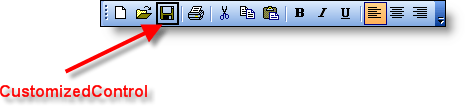
The picture below shows the control currently being customized during toolbar customization mode. Notice the Save button has a black focus rectangle around it. When a control is clicked during toolbar customization, a black focus rectangle is placed around the control. The control that has the black focus rectangle is copied into the CustomizedControl property. Any changes made to the CustomizedControl will also be made to the original control.
Example
Adding Custom Controls to the Context Menu (Visual Basic)
This sample illustrates how to add controls to the context menu that is displayed when a user right-clicks on a control during CommandBar customization.
'==========================================================================================================
' Customization Event
'==========================================================================================================

' Custom commands are added to the context menu in the Customization event. This event is
' fired each time the Customization dialog is displayed.
Private Sub CommandBars_Customization(ByVal Options As XtremeCommandBars.ICustomizeOptions)

    '==========================================================================================================
    ' Add custom controls to the context menu that is displayed when a control is
    ' right-clicked during customization
    '==========================================================================================================
    ' Add an edit control to the context menu that is displayed when the user right-clicks a
    ' control during customization. Passing a 4 in as the "Before" parameter will insert this
    ' edit control as the fourth control in the context menu. The control will have a caption
    ' label of "Parameter." When this control is clicked, the execute event is fired and
    ' the control will have an Id of ID_EDIT_PARAM. See description of CustomizeOptions.ContextMenu
    ' and CommandBars.CustomizedControl for more information on adding control to the context menu.
    Options.ContextMenu.Controls.Add xtpControlEdit, ID_EDIT_PARAM, "Parameter", 4

End Sub

'==========================================================================================================
' Execute Event
'==========================================================================================================

' The Execute event is triggered when the user clicks on a control added to the context menu
' by the developer. The CommandBars.CustomizedControl property points to the control that the
' user is currently customizing. This is the control that has the black frame placed around it
' during customization. The CommandBars.CustomizedControl property is how you know which control
' the user is customizing. When you make changes to the CommandBars.CustomizedControl, all changes
' will automatically be applied to the "original" control the user is customizing.
Private Sub CommandBars_Execute(ByVal Control As XtremeCommandBars.ICommandBarControl)

    On Error Resume Next

    Select Case Control.Id

        ' Id of the custom control added to the context menu, this was added
        ' during the Customization event. When the user hits the Enter key
        ' after typing text into the edit control added, the execute event is
        ' triggered and the control property contains a reference to the
        ' edit control.
        Case ID_EDIT_PARAM:
            Dim ControlEdit As CommandBarEdit

            ' Control is currently pointing to the custom control added
            ' to the context menu.
            Set ControlEdit = Control

            ' Update the "Parameter" property of the control to hold the text
            ' stored in the edit box. The CustomizedControl property is a pointer
            ' to the control that the user is customizing. So any changes made
            ' to the CustomizedControl will be applied to the control the user is
            ' currently customizing.
            CommandBars.CustomizedControl.Parameter = ControlEdit.Text

    End Select

End Sub
See Also
Copyright (c) 1998-2024 Codejock Technologies. All rights reserved.