ShellAutoComplete Property
See also
Description
Enables or disables the system's shell auto-completion functionality for the combo box.
Property type
Read-write
Syntax (Visual Basic)
Public Property ShellAutoComplete() As XTPShellAutoCompleteFlags
Remarks
Using ShellAutoComplete is similar to the behavior seen in Windows Explorer or Internet Explorer. As text is typed into the combo box, the shell will drop down a list of suggestions. For example, using the xtpShellAutoCompleteUrlHistory flag will cause the combo box to make suggestions from Internet Explorer's recent history.
See the XTPShellAutoCompleteFlags enumeration for a detailed description of the flags that control the operation of ShellAutoComplete.
Both the combo box and the Edit Control can use the ShellAutoComplete feature.
To use ShellAutoComplete, AutoComplete must be enabled on the system. You can change the AutoComplete settings manually by launching the Internet Options property sheet from the Control Panel and clicking the Content tab, then clicking the AutoComplete button. Make sure "Use AutoComplete for Web Addresses" is checked.
ShellAutoComplete requires Internet Explorer 5.0 or later to be installed.
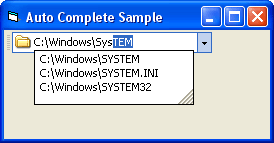
The image below shows a combo box control using the xtpShellAutoCompleteFileSysOnly flag.
Example
Combo Box ShellAutoComplete Sample (Visual Basic)
This sample illustrates how to use the shell auto-complete feature of the combo box.
Private Sub Form_Load()
    CommandBars1.Icons = ImageManager1.Icons

    Dim Control As CommandBarComboBox
    Set Control = CommandBars1.ActiveMenuBar.Controls.Add(xtpControlComboBox, 100, "Location")

    Control.Width = 200
    Control.ShellAutoComplete = xtpShellAutoCompleteFileSysOnly
    Control.DropDownListStyle = True
    Control.EditIconId = 101
End Sub
See also
Copyright (c) 1998-2024 Codejock Technologies. All rights reserved.