AutoComplete Property
Description
Enables or disables Auto Completion.
Property Type
Read-write property
Syntax (Visual Basic)
Public Property AutoComplete() As Boolean
Remarks
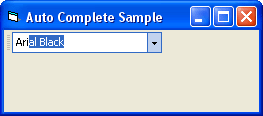
Using AutoComplete will cause the combo box to suggest an item as you type from the combo box's list of items. The suggestion will get more accurate as more characters are typed.
AutoComplete only makes suggestions from the combo box's list of items. Using ShellAutoComplete will cause the combo box to make suggestions from the file system, recent web history, etc. Both AutoComplete and ShellAutoComplete can be used at the same time.
In the picture below, "Ari" was typed, and the combo box was created using the code in the example below.
Example
AutoComplete Sample (Visual Basic)
This sample illustrates how to use the combo box AutoComplete functionality. Using AutoComplete will cause the combo box to auto-complete and suggest an item as you type from the combo box's list of items.
Private Sub Form_Load()
    Dim Control As CommandBarComboBox
    Set Control = CommandBars1.ActiveMenuBar.Controls.Add(xtpControlComboBox, 100, "Font")
    Control.Width = 150
    Control.AutoComplete = True
    Control.DropDownListStyle = True
    Control.AddItem "Arial"
    Control.AddItem "Lucida Handwriting"
    Control.AddItem "Arial Black"
    Control.AddItem "Algerian"
    Control.AddItem "Verdana"
    Control.AddItem "Arabic Transparent"
    Control.AddItem "Times New Roman"
    Control.AddItem "Arial Unicode MS"
    Control.AddItem "Courier New"
    Control.AddItem "Tahoma"
    Control.AddItem "Microsoft San Serif"
    Control.AddItem "Arial Narrow"
    Control.EditHint = "Select Font"
End Sub
See Also
Copyright (c) 1998-2024 Codejock Technologies. All rights reserved.