TabStyle Property
Description
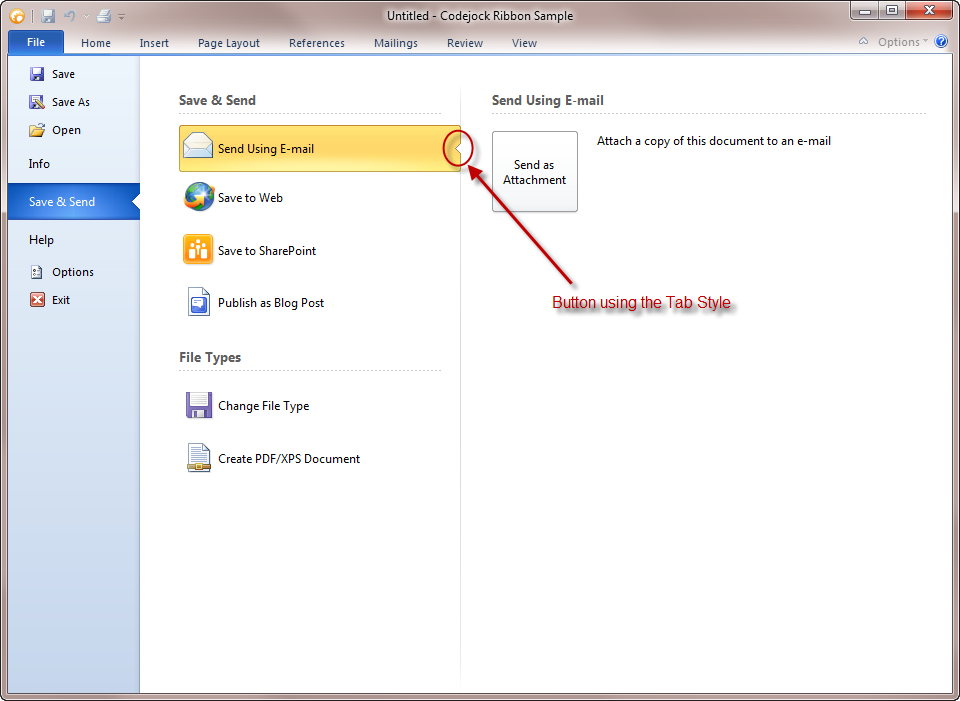
Specifies whether the button is used to display a "tab" that is used when a selected button shows contents in the backstage optional control pane. This is also referred to as "Second Tier Tabs".
Property Type
Read-write property
Syntax (Visual Basic)
Public Property TabStyle() As Boolean
Return Type
True if a tab is displayed in the button, False if the button is displayed normally.
Remarks
TabStyle is used when a button will display additional information when clicked in the optional controls pane. When set to True, a "tab" is displayed on the side of the button so that it appears to open up. This should be used in combination with the BackStageSeparator.
When True, the tab is then used as a "Second Tier Tab" that is intended to show more controls in the optional control pane when clicked.
Important: This property is only used when Checked is True.
See Also
Copyright (c) 1998-2024 Codejock Technologies. All rights reserved.