ChartNumberFormat Object
Description
Holds properties used to help format numbers to strings. This is used to format labels throughout the chart.
For a list of all members defined in this module, see ChartNumberFormat members.
Remarks
ChartNumberFormat is used to format strings for the various text labels in the chart. It is used to format the pattern, use a currency symbol, set decimal places, locale, etc.
First, you will see how to use only the Pattern to format a string. Then you will see how to use the other properties of ChartNumberFormat to make formatting easier and much more flexible. Some things, like inserting a thousands separator, can't be done with the pattern alone; you will need to use the UseThousandSeparator property.
In the sample below, the {A} means the ChartSeriesPoint's ArgumentValue, and the {V} means the Value.
Style.Label.Format.Pattern = "{A} ${V}K"
Note: Pattern is the default value for this object, so in some languages, you can simply set the Format property to the desired pattern:
Style.Label.Format = "{A} ${V}K"
Other formatting is available for numbers such as .03f, which means 3 decimal places for a floating point number.
Style3D.Label.Format.Pattern = "%.03f M"
Here, "g" is just the placeholder for standard numbers:
StylePie.Label.Format.Pattern = "%g M"
Using the ChartNumberFormat's properties makes formatting the string much easier and simplifies the pattern. For example, you don't need to set the type of data in the pattern (i.e., %g); it can be handled using the Category property. If you desire a thousands separator, you will need the UseThousandSeparator property. Decimal places are handled with the DecimalPlaces property. The Category is used to tell how to format the value (Number, Currency, Percent, Scientific, etc.). There are also properties to set the Date and Time if the value represents a Date and/or Time.
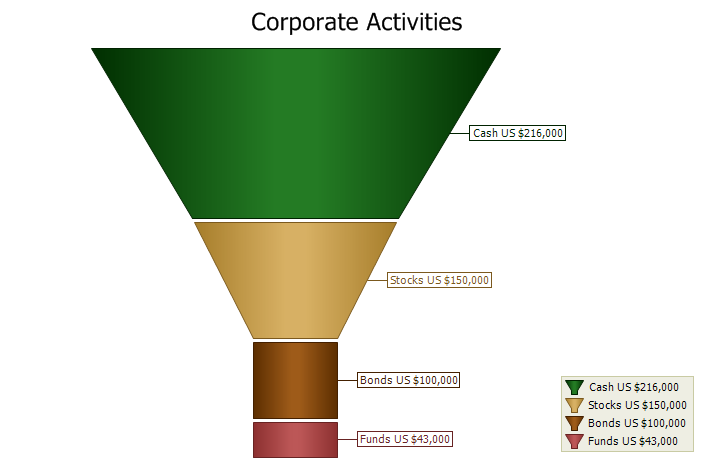
Here is a simple sample that formats a number as currency:
Style.Label.Format.Pattern = "{A} {V}"
Style.Label.Format.UseThousandSeparator = True
Style.Label.Format.DecimalPlaces = 0
Style.Label.Format.Category = xtpChartCurrency
Below, the funnel's labels are using this formatting from the sample above.
See Also
Copyright (c) 1998-2024 Codejock Technologies. All rights reserved.