Add Method
Description
Adds a new strip to the axis's collection of strips.
Syntax
Public Function Add( _
    ByVal [Name](#) As String _
) As [ChartAxisStrip](XtremeChartControl~ChartAxisStrip.md)
Parameters
- Name: Text that will be displayed in the legend for the strip.
Return Type
Reference to the ChartAxisStrip that was just added.
Remarks
Strips allow you to highlight a specific set of values along an axis. The values specified in the strip will become shaded, and an entry will be added to the legend for this strip so that you can describe the meaning of the strip. You can have as many strips as you need.
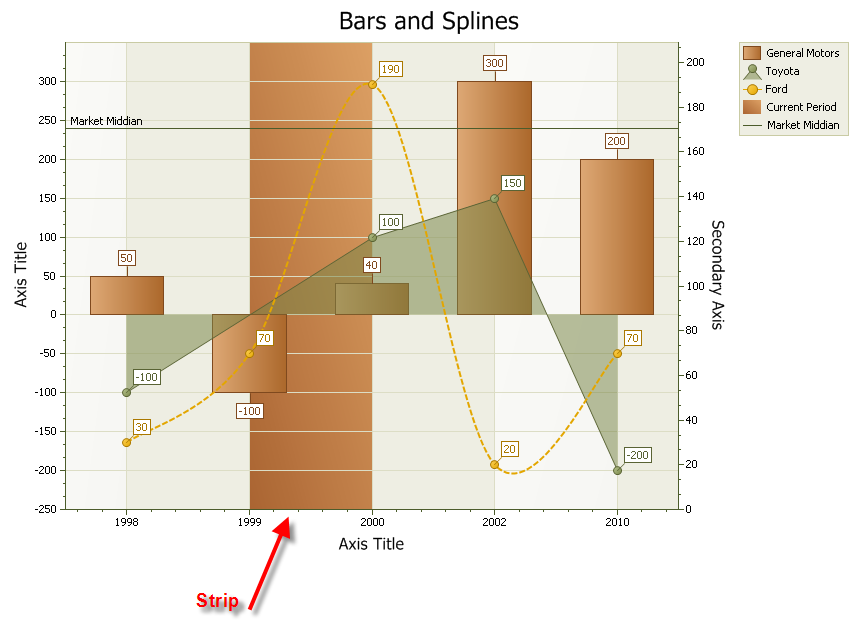
Example
Dim Strip As ChartAxisStrip
Set Strip = Diagram.AxisX.Strips.Add("Current Period")
Strip.FillStyle.FillMode = xtpChartFillGradient
Strip.FillStyle.GradientAngle = xtpChartGradientTopRightToBottomLeft
Strip.Color = RGB(170, 100, 50)
Strip.Color2 = RGB(220, 160, 100)
Strip.AxisMinValue = 1999
Strip.AxisMaxValue = 2000
See Also
Copyright (c) 1998-2024 Codejock Technologies. All rights reserved.