Object Nesting
Object declarations in DataFlex can be nested, allowing you to declare one object inside another. The outer object is referred to as the parent, and the inner objects are its children. The parent object is said to contain its children.
Object nesting is analogous to models of things that we see in the real world. For example, the structure of a car can be thought of as a compound object that is constructed from smaller component objects, such as 4 wheels, a chassis, an engine, a body, and so on. Each of these smaller components is also made up of other objects; an engine contains pistons, a crank, valves, etc.
A Real-World Example of a Compound Object

In terms of a computer application, let's imagine an order entry application. A typical Order Entry application is composed of many distinct modules: a customer maintenance view, an order entry view, a print orders view, an inventory maintenance view, and so on. Each one of these views contains multiple identifiable entities. A customer maintenance view, for example, will contain buttons, edit forms, labels, tabbed forms, combos, etc.
A Customer Entry View Demonstrating Nested Entities
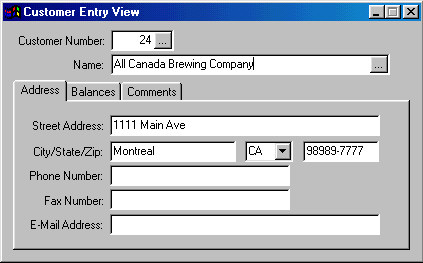
DataFlex represents this structure by nesting objects of different types inside each other. The structure of objects that you create in an application will be determined by its design specification. Below is the DataFlex object structure that was used to define the customer entry view shown above.
Object Customer is a dbView
    Set Label to "Customer Entry View"
    Set Size to 162 283

    Object Customer_DD is a Customer_DataDictionary
    End_Object

    Set Main_DD to Customer_DD
    Set Server to Customer_DD

    Object Customer_Number is a dbForm
        Entry_Item Customer.Customer_number
        Set Label to "Customer Number:"
        Set Size to 13 42
        Set Location to 5 72
    End_Object

    Object Customer_Name is a dbForm
        Entry_Item Customer.Name
        Set Label to "Name:"
        Set Size to 13 186
        Set Location to 20 72
    End_Object

    Object CustTD is a dbTabDialog
        Set Size to 105 265
        Set Location to 36 7

        Object Address_TP is a dbTabPage
            Set Label to "Address"

            Object Customer_Address is a dbForm
                Entry_Item Customer.Address
                Set Label to "Street Address:"
                Set Size to 13 180
                Set Location to 8 62
            End_Object

            Object Customer_City is a dbForm
                Entry_Item Customer.City
                Set Label to "City/State/Zip:"
                Set Size to 13 84
                Set Location to 24 62
            End_Object

            Object Customer_State is a dbComboForm
                Entry_Item Customer.State
                Set Size to 13 32
                Set Location to 24 152
            End_Object
            // etc.
        End_Object

        Object Balances_TP is a dbTabPage
            Set Label to "Balances"

            Object Customer_Credit_Limit is a dbForm
                Entry_Item Customer.Credit_limit
                Set Label to "Credit Limit:"
                Set Size to 13 48
                Set Location to 9 72
            End_Object
            // etc.
        End_Object

        Object Comments_TP is a dbTabPage
            Set Label to "Comments"

            Object Customer_Comments is a dbEdit
                Entry_Item Customer.Comments
                Set Size to 60 242
                Set Location to 15 9
            End_Object
        End_Object
    End_Object
End_Object
Note that this example uses the Entry_Item command. Refer to the DataFlex Language Reference for more information on this command.