Working with Alias Tables and DDs
The Studio has an option for creating an Alias Table and an Alias DD class. If you right-click on a Table in Table Explorer, you have an option to create an Alias Table and DD.
Alias DDs are now sub-classed from their master Table’s DD. The Set Alias_File message specifies that the DD sub-class is an alias.
There is no need to set alias and master attributes for the tables; it is figured out automatically.
An alias DD is created by sub-classing its master DD, setting the Alias_File property, and adjusting other properties and events as appropriate for the alias. A simple alias DD created by the Studio would look like this:
Class cSalesPManagerDataDictionary is a SalesP_DataDictionary
    Procedure Construct_Object
        Forward Send Construct_Object
        Set Alias_File to SalesPManager.File_Number
        Set pbUseDDRelates to True
        Set pbNoCascadeDeleteStrict to True
        Set pbForeignReadOnly to True
    End_Procedure

    Procedure Update
    End_Procedure

    Procedure Backout
    End_Procedure

    Procedure Deleting
    End_Procedure

    Procedure Creating
    End_Procedure
    // .. more Studio-generated events below
End_Class
In the above example, the alias table, SalesPManager, must already be added to the filelist. Since alias tables are normally used as parents, presumably some other DD will relate to this alias table using either Table or DD relationships.
Note that the alias DD class is sub-classed from a master class. The Set Alias_File sets the alias table number and specifies that this is an alias DD.
It is advised that alias tables use local DD relationships and this is why pbUseDDRelates is set to True. If this alias DD had parents, presumably other alias DDs, you will need to establish those relationships using local DD relates (Set Field_Related_FileField). Often alias tables do not need to refer to their parents. If this is the case, there is no need to define those relationships.
The pbNoCascadeDeleteStrict property is set to True because it is the best default for DDs that use local relates.
The pbForeignReadOnly property is set to True, which tells the DD that this record will not get changed as part of a child DDO save. Normally, these are the kinds of changes that occur inside of a child DDO’s Backout and Update events, and normally alias tables should not be changed in this way. If a change occurs, this is considered a programming error and a runtime error will be raised. This property is set because this is the most likely default for an alias DD. You can change this if needed.
The Updating, Delete, Creating, and other events are all canceled here because any code in the super-class would most likely apply to the master table and not the alias table. Usually, you will not need to augment these events in alias DDs. If you do, you will most likely not want to forward the message.
Set Alias_File to iFileNumber
This declares this DD to be an alias DD and makes iFileNumber the Main_File for this DD. This creates an alias DD based on this new file. Main_File is assigned iFileNumber and the old Main_File, which is the master file, is stored and accessible via Get MasterForAlias. It also initializes the class to work as an alias, which is mostly done by calling DefineAsAlias.
Main_File must be set before the Alias_File message is set. Normally, the Main_File will have been set in the DD superclass, although it is permissible albeit unusual to set both the Main_File and the Alias_File in a single class (in that order).
You can only define an alias file for a DD that: 1. has a main-file and 2. is not yet an alias.
In other words, you can use this to sub-class regular DD classes, but you cannot use it to sub-class alias DD classes.
Send DefineAsAlias
This is called by Set Alias_File and it sets up this DD to work as an alias. It can be augmented. If augmented, it should be forwarded.
The main purpose of DefineAsAlias is to clear any DD settings that might have been set in the master superclass that do not apply to the alias. If it clears any local DD relationships, it clears all required servers and clients and all prompt and zoom field settings.
Get IsAlias to bAlias
Returns true if this is an alias table.
Get MasterForAlias to iFile
Returns the file number of the master file. If this is not an alias, it returns 0.
Table Locking and Alias DDs
There is no need to set DF_FILE_ALIAS to either alias or master as the DDs will take care of the file locking as needed. You also don't have to worry if the master DD is part of the DDO structure. If it is not, the alias DD will be treated like a normal DD.
This is done within Reset_FileModes_For_Lock. If a DD is an alias, the DD will check to see if the master DD is part of the structure. If it is, it sets the alias file’s filemode to no lock.
Important: If your tables are embedded (i.e., table locking), this requires that Smart_FileMode_State be set to True, which is the default and is rarely changed. If you do not use smart-file mode, you must set the DF_FILE_ALIAS attributes for the master and alias table in the traditional fashion.
Why Alias Sub-classing Works
Any DD field settings set in the master super-class will be properly applied to the alias class. This might seem odd because the Field syntax applied to the super class uses the table name of the master table and not the alias table (e.g., Set Field_Xxxx Field MasterName.Field to Xxxxx).
The reason you can sub-class an existing class centers around the way the Field_Xxxxx messages and the Field parameter work. For example, Set Field_Label_Long Field SalesP.Name to “Name” is actually table-agnostic. At compile time, this actually becomes Set Field_Label_Long 2 to “Name” and applies this to the DD’s file number. Therefore, the Field settings in the master superclass DD are applied to the alias table even though the table name is different. For example, if you wanted to change the alias label for ID to manager, you could use either of these syntaxes:
Set Field_Label_Long Field SalesP.Id to “Manager ID”
Set Field_Label_Long Field SalesPManager.Id to “Manager ID”
This applies to the FIELD syntax and not the FILE_FIELD syntax. Fortunately, DDs are defined using the FIELD syntax and it all just works.
Also note that this does not apply to any code that directly uses a file.field name such as Move 0 to SalesP.Count. This kind of code most often occurs inside of your save and delete code such as Update and Backout. You should augment your alias DD to make sure this kind of code is not called.
Compatibility Issues
This type of alias DD is a new feature. Existing alias tables and alias DDs will continue to work exactly as they always did and should work side by side with the newer alias DD technology.
Any instances of tables being used as master or alias tables that do not use Data Dictionaries need to continue using the DF_File_Alias attribute.
Alias Table Tips
-
Once an alias table is created and a Data Dictionary for that alias is created, it is treated (almost) like a normal table. When DataFlex builds your views, it will treat the alias table like any other table in your list.
-
Try to keep the alias table simple. Ideally, an alias table should be read-only. When a child record is saved, the child should avoid changing data in the alias (which can happen through the child Data Dictionary’s Update and Backout events).
-
Master and alias tables will each have their own Data Dictionary, and each of these DDs will be different. Usually, the alias Data Dictionary will be much simpler than the master Data Dictionary.
-
Do not try to make master and alias tables share the same lookup object. If an alias table requires a lookup object, create a separate lookup object for the alias table.
-
If you change the master table’s structure, you will also change the alias table’s structure. In such a case, you will need to reload the alias table’s Data Dictionary and make the appropriate changes.
-
If you delete an alias table, you will also delete the master table.
-
If alias tables are being written to during a save, you must be careful if the main and alias record happen to be the same physical record. If the record’s numerical balance is changed in the child’s Data Dictionary Update or Backout procedure (e.g.,
Move (Address2.OrderCount+1) to Address2.OrderCount), an inaccurate balance may be created. It is up to you to protect against this. -
Keep in mind that the use of alias tables is an advanced technique. A typical developer may never need to use this technique. Avoid using alias tables if you do not really need them.
-
Do not use this as a method to see multiple sets of records within the same view. For example, creating an alias table so you could view all open invoices and all closed invoices within the same view is an inappropriate use of this technique.
-
You do not need to create an alias table to support diamond relationships. Consider the following example:
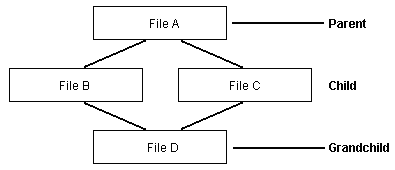
In a diamond relationship, the top of the diamond (A) will be the same parent for both child records (B and C). If a record is found in the grandchild (D), the relate process will result in the same parent record in A regardless of the finding path (D to B to A, D to C to A). These types of diamond relationships are directly supported by Data Dictionaries. Using an alias for this is unnecessary.