Table Character Format in DataFlex 20
DataFlex 19.1 (and older) and the SQL drivers 6.3 (and older) only supported ANSI or OEM data. ANSI and OEM are single-byte encodings that are limited to 256 characters (no Unicode).
When using the full Unicode capabilities of DataFlex, only ANSI and Unicode character formats are supported. The OEM character format is still supported for backward compatibility and using the embedded database, but it is strongly recommended to migrate OEM tables to ANSI/Unicode.
ANSI/OEM Handling in Prior Revisions
With DataFlex 19.1/SQL drivers 6.3 (Oldgen), data can be stored as either ANSI or OEM in the database. This is specified by the Table_Character_Format setting in the table INT file.
ANSI and OEM code pages consist of 256 characters. The first 128 characters are the same for ANSI and OEM code pages (ASCII characters). The last 128 characters are different for ANSI and OEM code pages - these are called extended characters and contain the accented characters, amongst others.
Most database systems can store data as ANSI or OEM. This usually depends on code page settings of the SQL database, but ANSI code pages are the most common in SQL databases:
- SQL Server normally stores data as ANSI data.
- DB2 supports both ANSI and OEM code pages.
- Other databases (e.g., MySQL, PostgreSQL, etc.) also support several ANSI and OEM code pages.
Normally, when the SQL database uses an ANSI code page, the Table_Character_Format will also be set to ANSI, but it is also possible to use an ANSI code page for the database and have the Table_Character_Format set to OEM. Such tables are referred to as OEM tables.
In Oldgen DataFlex, the default settings in the drivers and DataFlex Studio were such that new tables would be created with Table_Character_Format set to OEM, even when the SQL database uses an ANSI code page. As a consequence, some DataFlex Oldgen systems have their tables defined as OEM tables where they really should have been ANSI.
Having OEM tables in an ANSI database means:
- Pure ASCII data (<= 127) are the same in ANSI and OEM and cause no problems.
- Non-ASCII data (> 128) is different between ANSI and OEM. Accented characters will display differently in ANSI and OEM code pages.
- Inside DataFlex programs, OEM tables will not have issues. String values will be converted from/to OEM/ANSI when needed, and data will always be displayed correctly.
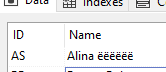
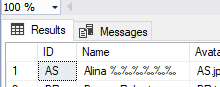
- When looking at data from outside DataFlex, data from OEM tables will look incorrect. For example, if the SalesPerson table is OEM, and accented characters are saved via Database Explorer, it may appear as follows:
In SQL Server Management Studio, that same row will show as:
- Any external (non-DataFlex) application will show non-ASCII data from OEM tables incorrectly.
- Note that it makes no difference if the column is
char/varcharornchar/nvarchar. The data will show incorrectly for both.
OEM/ANSI Handling in DataFlex 20.0
DataFlex 20.0/SQL drivers 20.0 now handle Unicode data. String data in databases can have various formats, including Unicode formats like UTF-8 or UTF-16. ANSI tables created with earlier (pre-20) DataFlex versions are supported and can be used in DataFlex 20 without changes. OEM tables are still supported in DataFlex 20, although this is just for backward compatibility. In general, OEM tables should no longer be used with DataFlex 20. Existing OEM tables should be converted to ANSI/Unicode. The Table_Character_Format setting in the table INT file is still used but has a slightly expanded meaning.
Table_Character_Format ANSI
- The name does not quite cover the functionality anymore. ANSI should be interpreted as ANSI or UNICODE.
- When set to ANSI, data may still be stored as ANSI but also as Unicode (UTF-8 or UTF-16). This depends on the underlying data type.
- SQL Server
char/varchartypes still store as ANSI, butnchar/nvarchartypes store as UTF-16. - It is also possible to store data as UTF-8 in
char/varcharcolumns (for example, in MySQL and DB2 Unicode databases).
Table_Character_Format OEM
This has now become a backward compatibility setting for OEM tables created with Oldgen drivers. With this setting, data is stored/retrieved to/from the database as OEM data.
Characteristics of OEM tables in Nextgen:
- OEM tables read/write data to the database as OEM.
- OEM tables are backward compatible with Oldgen OEM tables.
- OEM tables are slower because the driver needs to perform OEM/Unicode conversions.
- Non-ASCII data (> 128) from OEM tables will be incorrectly stored in the database.
- When viewed through some non-DataFlex program, non-ASCII data will be incorrect.
- Non-ASCII data will be incorrect in both
char/varcharandnchar/nvarchartype columns. - It is not possible to store Unicode data in OEM tables or in any
nchar/nvarcharcolumns!
Migrating OEM Tables
In DataFlex 20, OEM tables are only supported for backward compatibility. When migrating to DataFlex 20, OEM tables should be converted to ANSI/Unicode tables.
The Database Builder in DataFlex 20 contains an OEM to ANSI Conversion Wizard to convert OEM tables to ANSI tables. The wizard will detect all OEM tables in a workspace that can subsequently be selected for conversion to ANSI.
Important!
The OEM/ANSI conversion wizard will irreversibly change your data. Make sure you have a proper backup of your entire database and all your INT files before running the conversion!
- The conversion wizard will convert all extended characters (non-ASCII characters) from OEM to ANSI.
- The conversion will change the
Table_Character_Formatsetting in the table INT file from OEM to ANSI. - Note that this can be a lengthy process, even when a table contains only ASCII (< 128) data and no actual conversion is needed.
- The wizard will irreversibly change your data. Make sure you have a proper backup of your entire database.