Showing the Employee Photo from the Northwind Sample
The sample database Northwind that is installed with SQL Server contains a table called Employees that stores a photograph of the employees in an image column. We will extract the information from that column and store it as a bitmap in a disk file. We use the bitmap format because that is the format used to store the photograph in the table.
The data stored in the Employees.Photo column contains 79 bytes of extra information after which the bitmap is stored. These 79 bytes are ignored, and the rest of the column is written to a disk file. This “bitmap header” probably contains information from the COM object used to create and manipulate the bitmap. The purpose of this sample is to show how to get information from large columns. This is why we ignore the header and concentrate on the essentials. We extract the information from the Photo column by using the Embedded SQL SQLGetData function.
We can use the described technique in a DataFlex view to show the photo next to columns from a record. The photo is displayed by using a BitmapContainer object. The other columns of the table are shown through normal dbForm objects.
In order to be able to use the column in dbForm objects, we need to create an intermediate file for the Employees table. We use the Connect Wizard in Database Builder for this. After connecting to the table, a view was created in DataFlex Studio. In this view, the procedure Entry_Display of the EmployeeID dbForm was augmented in the following way:
DRIVER_NAME MSSQLDRV
SERVER_NAME SERVER=(local);Trusted_Connection=yes;DATABASE=NorthWind
DATABASE_NAME Employees
SCHEMA_NAME dbo
PRIMARY_INDEX 1
GENERATE_RECORD_ID_METHOD NONE
TABLE_CHARACTER_FORMAT ANSI
USE_DUMMY_ZERO_DATE YES
INDEX_NUMBER 1
INDEX_NAME PK_Employees
INDEX_NUMBER 2
INDEX_NAME LastName
INDEX_NUMBER 3
INDEX_NAME PostalCode
After creating the intermediate file, an .fd file was generated when adding the table to the DataFlex filelist in Database Builder (Filelist | New Entry). A Data Dictionary was generated, and a view was created in DataFlex Studio. In this view, the procedure Entry_Display of the EmployeeID dbForm was augmented in the following way:
Procedure Entry_Display Integer iFile Boolean bDoAll
    Forward Send Entry_Display iFile bDoAll
    Send ShowEmployeeBitmap
End_Procedure // Entry_Display
The ShowEmployeeBitmap procedure extracts the bitmap from the Employees table on SQL Server using Embedded SQL. It does this by getting 1KB chunks from the column and processing those chunks.
Procedure ShowEmployeeBitmap
    Integer iEmployeeID
    Handle hoESQLManager
    Handle hdbc
    Handle hstmt
    Integer iFetchResult
    String sChunk
    Boolean bTruncate

    Get Field_Current_Value Of Employee_DD FIELD Employee.EmployeeID To iEmployeeID
    If (iEmployeeID <> 0) Begin
        Get Create U_cSQLHandleManager To hoESQLManager
        If (hoESQLManager > 0) Begin
            //*** Create a connection to the SQL datasource
            Get SQLFileConnect Of hoESQLManager Employee.File_number To hdbc
            If (hdbc <> 0) Begin
                Get SQLOpen Of hdbc To hstmt
                If (hstmt <> 0) Begin
                    Send SQLExecDirect Of hstmt ("SELECT photo FROM Employees Where EmployeeID =" * String(iEmployeeID))
                    Move True To bTruncate
                    Repeat
                        Get SQLFetch Of hstmt To iFetchResult
                        If (iFetchResult > 0) Begin
                            Send ClearBitmapFile
                            Repeat
                                Get SQLGetData Of hstmt 1 1024 To sChunk
                                Send AddChunkToBitmapFile sChunk bTruncate
                                Move False To bTruncate
                            Until (SQLResult = 0)
                            Send ShowPhotoFromBitmapFile
                        End
                    Until (iFetchResult = 0)
                    Send SQLClose Of hstmt
                End
                Else ;
                    Error 997 "Unable to create a statement handle."
                Send SQLDisconnect Of hdbc
            End
            Else ;
                Error 998 "Unable to create a handle to a connection."
            Send Destroy Of hoESQLManager
        End
        Else ;
            Error 999 "Cannot create an Embedded SQL Manager object."
    End
    Else ;
        Set Bitmap Of oEmployeeBitmap To ""
End_Procedure // ShowEmployeeBitmap

Procedure ClearBitmapFile
    Direct_Output Channel 1 "c:\project\empphoto.bmp"
End_Procedure // ClearBitmapFile

Procedure AddChunkToBitmapFile String sChunkInHex Boolean bTruncate
    Char cBinChar
    String sBinChar
    Integer iBinChar
    Integer iChunkLen
    Integer iCount
    Integer iStart

    Move (Length(sChunkInHex)) To iChunkLen
    If (bTruncate) ;
        Move 79 To iStart
    Else ;
        Move 1 To iStart

    For iCount From iStart To (iChunkLen / 2)
        Move ("$" + Mid(sChunkInHex, 2, ((iCount - 1) * 2) + 1)) To sBinChar
        If (sBinChar <> "$") ;
            Write Channel 1 (Character(Integer(sBinChar)))
        Else ;
            Move iChunkLen To iCount
    Loop
End_Procedure // AddChunkToBitmapFile

Procedure ShowPhotoFromBitmapFile
    Close_Output Channel 1
    Set Bitmap Of oEmployeeBitmap To "c:\project\empphoto.bmp"
End_Procedure // ShowPhotoFromBitmapFile
Embedded SQL returns binary columns as hexadecimal values. The procedure AddChunkToBitmap converts the hexadecimal value of the column to the “real” value.
The resulting view looks like this:
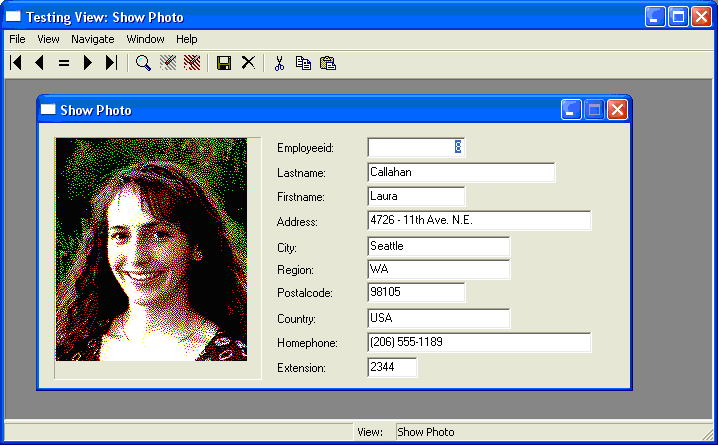
The purpose of this section was to demonstrate how to access large data (BLOBs, CLOBs, and the like). It does not use the best or most efficient way to show the picture in the view.