Aggregate Objects
Many COM objects are actually composed of a structure of COM objects. In COM, this is known as aggregation. Aggregation means that the containing (outer) object creates the contained (inner) object(s) as part of its creation process, and the interfaces of the inner object are exposed by the outer.
A good example of aggregation is the MS Word Automation Library. The diagram below shows the simplified structure of objects for the MS Word 8 Automation library.
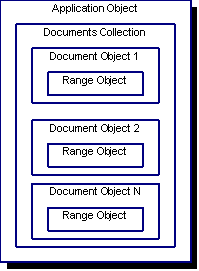
In this structure, the application object represents the MS Word 8 application; the documents collection represents the collection of Word documents currently open in the application; the document objects correspond to each open document; and the range objects represent the text contained within each document.
When you import the MS Word 8 Automation library into the Studio, the following corresponding classes are generated:
cComApplicationcComDocumentscComDocumentcComRange
To access Word Automation in your DataFlex application, you must create an instance of cComApplication and attach it to a Word Automation server as shown in the following code sample:
// Create a Word Automation wrapper Object
Object oWordApplication is a cComApplication
End_Object

// Launch the Word Automation Server application and attach
// the wrapper Object to it.
Send CreateComObject of oWordApplication
Now your program is ready to interact with a MS Word Automation Server. However, this alone does not give you access to a Word document. The interface for working with a document is contained within the cComDocument class, which is, in turn, maintained by a document's collection via the cComDocuments class.
The Word Application object does provide a COM object reference to its documents collection via its ComDocuments property. Thus, we can attach to the documents collection with the following code:
// Create a Documents collection wrapper for the Word application
Object oDocuments is a cComDocuments
End_Object

Function AttachDocumentsCollection Returns Boolean
    // Attach the documents collection wrapper to the COM
    // documents collection Object inside oWordApplication.
    Variant vDocuments
    Boolean bSuccess

    // We can't access oWordApplication's COM interface until
    // it is attached to a Word Automation Server.
    Get IsComObjectCreated of oWordApplication To bSuccess
    If (bSuccess) Begin
        // Get the documents collection COM Object reference from
        // oWordApplication.
        Get ComDocuments of oWordApplication to vDocuments

        // Now attach oDocuments to this COM Object.
        Set pvComObject of oDocuments to vDocuments
        If (IsNullComObject(vDocuments)) Move False To bSuccess
    End
    Function_Return bSuccess
End_Function
Now that we have access to the Documents collection, we can use its interface to open or create Word documents. We need at least one Document wrapper object in our application to be able to interact with the COM document objects in our collection.
Here is how to open a new Word document and attach its corresponding COM object to our DataFlex document wrapper:
Object oDocument is a cComDocument
End_Object

Function NewDocument Returns Boolean
    // Open a new document in the documents collection and attach
    // it to our global Word document wrapper.
    Variant vDocument
    Boolean bSuccess

    // We can't access oDocuments COM interface until it is attached
    // to the COM documents collection Object inside oWordApplication.
    Get IsComObjectCreated of oDocuments To bSuccess
    If (bSuccess) Begin
        // Use the documents collection to create a new Word document
        Get ComAdd of oDocuments to vDocument

        // Now attach oDocuments to this COM Object.
        Set pvComObject of oDocument to vDocument
        If (IsNullComObject(vDocument)) Move False To bSuccess
    End
    Function_Return bSuccess
End_Function
Aggregation can also be found in ActiveX controls and Embedded Document objects. In this case, the objects contained within the ActiveX are instantiated as Automation objects. You would use the techniques described above to gain programmatic access to these objects and their interfaces.