More Intuitive Product Registration
DataFlex 11.0 includes a new registration program that provides a single interface to multiple product registrations. For instance, after installing and registering the DataFlex Studio with Serial Number 1, you would see the following product registrations:
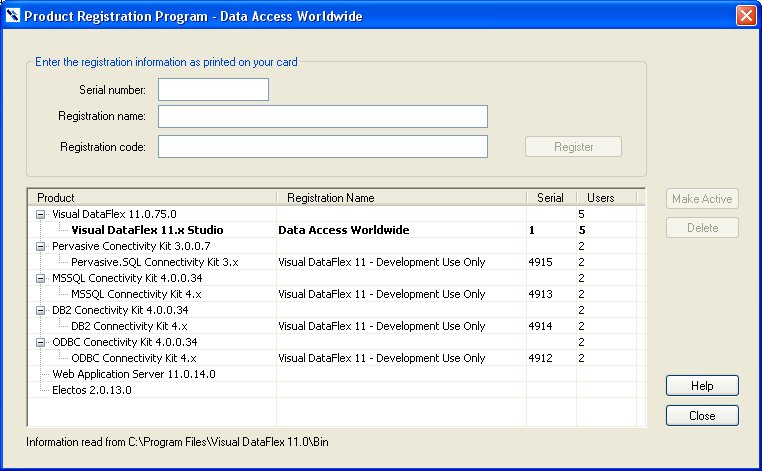
The registration program searches the Bin folder and determines the products that are present (DataFlex, various Connectivity Kits, and the Web Application Server). All of these products are displayed and include useful information about the revision(s) found and any registrations for each product. The Web Application Server does not have a specific registration shown because the DataFlex Studio license controls the behavior of the server, and a separate registration is not required.
The registration program also has improved consistency and error checking, as follows:
-
If an evaluation registration is present for DataFlex or the Web Application Server, entering a full registration will trigger a warning and, if accepted, will automatically remove the evaluation registration.
-
If a full registration is present for DataFlex or the Web Application Server, entering an evaluation registration will trigger a warning and, if accepted, will automatically remove the full registration.
-
If the product registration does not match the revision of the installed product, a warning will be generated, and the registration will not be accepted. Keep in mind that some product registrations support multiple product revisions, while others do not.
All of the logic supporting these changes is complete, but the user interface will be tweaked before release.