Integrating Multiple Drill Down Reports
In the previous two topics, you learned how to create Order and Order Detail header/child reports and how the Order Detail report can be easily integrated with the Order report so a user can quickly and intuitively see all orders and "drill down" to see the details of that order.
You are now going to complete the "drill down" concept for the List Orders Drill Down Report by adding the Orders Drill Down report to this report. Once completed, users will be able to run the customer report, "drill down" to the details for each customer, including all of that customer's orders, and then "drill down" again to view the details for each order.
Steps to Integrate the Orders Drill Down Report
-
In the Studio, click the Open File(s) toolbar button:
-
Navigate to the
AppHtmlfolder of theOrderTutorialworkspace, selectCustomerDrillDownReportZoom.asp, and click the Open button. -
Scroll down to the bottom of this file until you see the end of an HTML table, marked by
</table>. Below the end of this table, you are going to add code that will call the Orders Drill Down report.
Add the code below on the line below the </table> line:
<%
dim ZoomURL, EndRowId
ZoomURL = "OrderDtlReport.asp" ' name of zoom file. If blank none.
oOrdersByCustomer.call "msg_SetHRefName", ZoomUrl
EndRowId = oOrdersByCustomer.call("get_RunOrdersByCustomer", RowId)
%>
-
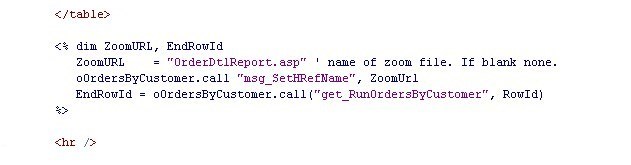
The completed code should look like this:
-
Now, let's test our completed report.
Click on the Run button on the Studio's toolbar. The Studio will run your project (there is no DataFlex code to recompile). When the application runs, your browser should display thetestcontent.htmpage. -
Click on the Customer Drill Down Report link, then click the Run Report button.
-
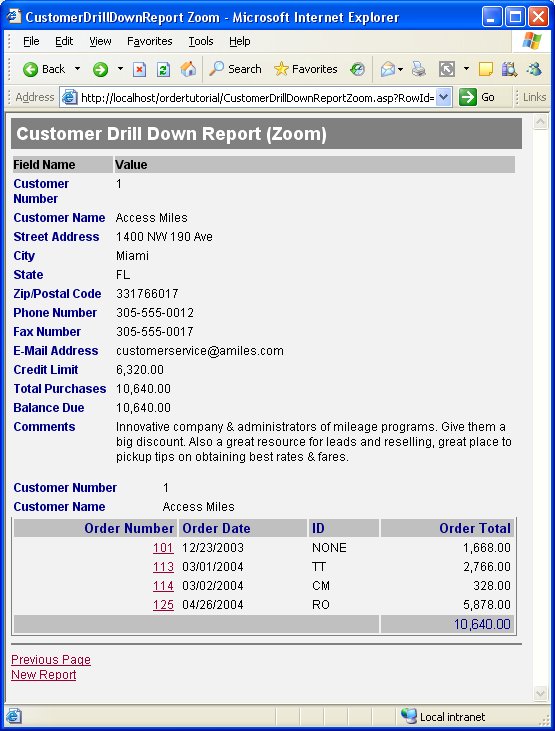
Click on the link for customer Access Miles. You will see the Customer Details and now also all orders for this customer.
-
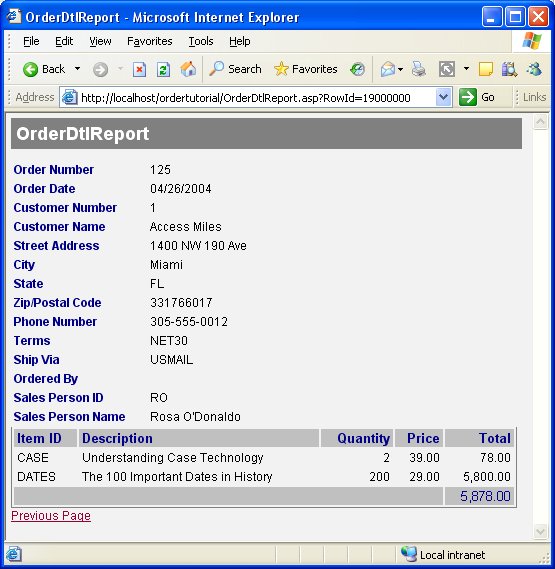
Click on order number 125. You will see the Order Detail Report for order 125.