MultiColumn Property
Description
Enables or disables the use of multi-column groups for layouts other than image layout.
Property Type
Read-write property
Syntax (Visual Basic)
Public Property MultiColumn() As Boolean
Remarks
The MultiColumn property is used to enable multiple columns of items within a group. This will allow multi-column item layout for layouts other than just image layout. The image layout will always be multi-column. The ColumnWidth property is used to specify the width of all columns within the groups.
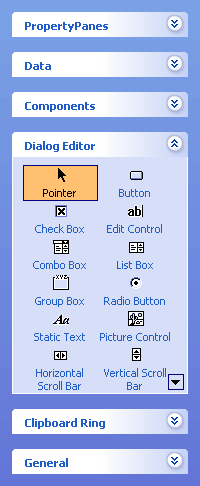
Below is a picture of a group with multiple columns enabled with a ColumnWidth of 75 pixels.
Example
Multi-Column Groups Sample (Visual Basic)
This sample illustrates how to enable multi-columns in groups and how to set the width of all columns in the groups.
' Enable multi-columns in groups
wndToolBox.MultiColumn = True

' Specify the width of columns in groups
wndToolBox.ColumnWidth = 75
See Also
Copyright (c) 1998-2024 Codejock Technologies. All rights reserved.