EnableMarkup Property
Description
Allows the use of a XAML snippet to be used for the Caption of Task Panel Items.
Property Type
Read-write property
Syntax (Visual Basic)
Public Property EnableMarkup() As Boolean
Remarks
If set to True and a valid XAML snippet is set to the Caption of Task Panel Items, then the Caption will be displayed as rendered XAML.
If set to False, then any text in the Caption, even if valid XAML, will get displayed in plain text.
The picture below shows many controls using snippets of XAML:
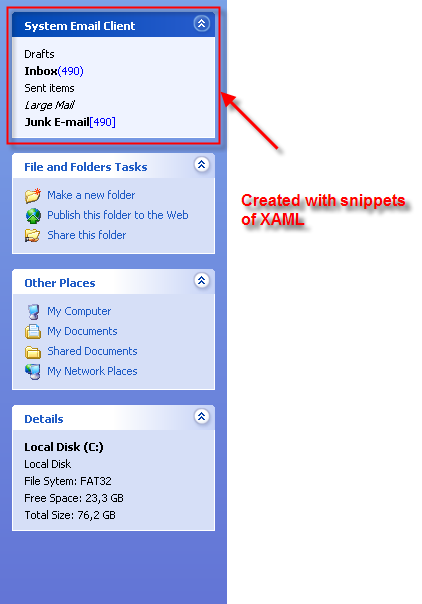
Example
'Global definitions

Const ID_TASKITEM_DRAFTS = 632
Const ID_TASKITEM_INBOX = 633
Const ID_TASKITEM_SENT = 634
Const ID_TASKITEM_LARGEMAIL = 635
Const ID_TASKITEM_JUNK = 636

Private Sub Form_Load()
    Dim Group As TaskPanelGroup
    Dim Item As TaskPanelGroupItem

    wndTaskPanel.EnableMarkup = True

    Set Group = wndTaskPanel.Groups.Add(0, "System Email Client")
    Group.Tooltip = "These tasks apply to your default email client"
    Group.Special = True

    Group.Items.Add ID_TASKITEM_DRAFTS, "Drafts", xtpTaskItemTypeText
    Group.Items.Add ID_TASKITEM_INBOX, "Inbox(490)", xtpTaskItemTypeText
    Group.Items.Add ID_TASKITEM_SENT, "Sent items", xtpTaskItemTypeText
    Group.Items.Add ID_TASKITEM_LARGEMAIL, "Large Mail", xtpTaskItemTypeText
    Group.Items.Add ID_TASKITEM_JUNK, "Junk E-mail[490]", xtpTaskItemTypeText
End Sub
See Also
Copyright (c) 1998-2024 Codejock Technologies. All rights reserved.