UpDown Control
See Also
UpDown Members | BuddyControl Property | AutoBuddy Property | Increment Property | Max Property | Min Property | Value Property | Orientation Property

Description
An UpDown control has a pair of arrow buttons which the user can click to increment or decrement a value, such as a scroll position or a value in an associated control, known as a buddy control.
For a list of all members defined in this module, see UpDown Members.
Object Model



Remarks
An "up-down control" is a pair of arrow buttons that the user can click to increment or decrement a value, such as a scroll position or a number displayed in a companion control. The value associated with a spin button control is called its current position. A spin button control is most often used with a companion control, called a "buddy control."
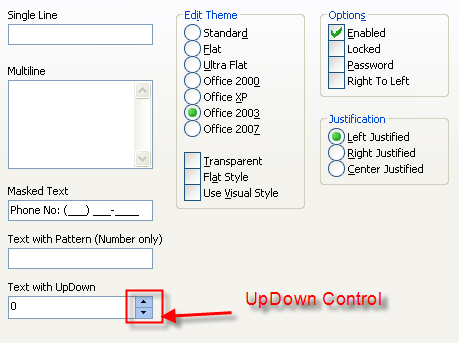
To the user, an UpDown control and its buddy control often look like a single control. The buddy control can be any control that can be linked to the UpDown control through the BuddyControl property, and usually displays data, such as a FlatEdit control or a PushButton control.
By setting the AutoBuddy property, the UpDown control automatically uses the previous control in the tab order as its buddy control. If there is no previous control in the tab order, the UpDown control will use the next control in the tab order as its buddy control. Another way to set the buddy control is with the BuddyControl property. At design time, when either the AutoBuddy property or the BuddyControl property is set, the buddy control will automatically pair up with the UpDown control by sizing and positioning next to it.
Note: If you change the TabIndex property of a control so that it can be used with AutoBuddy, you will need to set AutoBuddy to False and then to True again to get the UpDown control to update itself.
The Increment, Min, and Max properties specify how the UpDown control's Value property changes when the user clicks the buttons on the control. For example, if you have values that are multiples of 10, and range from 20 to 80, you can set the Increment, Min, and Max properties to 10, 20, and 80, respectively.
An UpDown control without a buddy control functions as a sort of simplified scroll bar.
See Also
UpDown Members | BuddyControl Property | AutoBuddy Property | Increment Property | Max Property | Min Property | Value Property | Orientation Property
Copyright (c) 1998-2024 Codejock Technologies. All rights reserved.