DefaultButton Property
Description
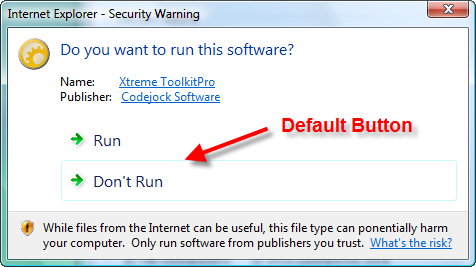
Gets or sets the default button ID for the task dialog.
Property Type
Read-write property
Syntax (Visual Basic)
Public Property DefaultButton() As Long
Remarks
DefaultButton may be any of the values specified when calling the AddButton method, or one of the IDs corresponding to the buttons specified in the CommonButtons property:
| Value | Description |
|---|---|
| 0 | Function call failed. |
| xtpTaskButtonCancel | Cancel button was selected, Alt-F4 was pressed, Escape was pressed, or the user clicked on the close window button. |
| xtpTaskButtonNo | No button was selected. |
| xtpTaskButtonOK | OK button was selected. |
| xtpTaskButtonRetry | Retry button was selected. |
| xtpTaskButtonYes | Yes button was selected. |
If DefaultButton is zero or its value does not correspond to any button ID in the dialog, then the first button in the dialog will be the default.
The ButtonClicked event occurs when a button is clicked and is used to determine which button was selected. The AddButton method is used to add buttons.
See Also
- TaskDialog Control
- ButtonClicked Event
- AddButton Method
- EnableCommandLinks Property
- CommonButtons Property
- EnableButton Method
Copyright (c) 1998-2024 Codejock Technologies. All rights reserved.