Resizer Control
Description
The Resizer control allows for dynamic resizing of controls within a specified area.
For a list of all members defined in this module, see Resizer Members.
Remarks
The Resizer control features a properties window available at design time, enabling you to set various properties and add controls that can be resized as the Resizer is adjusted.
To access the properties window, right-click on the control and select Properties.
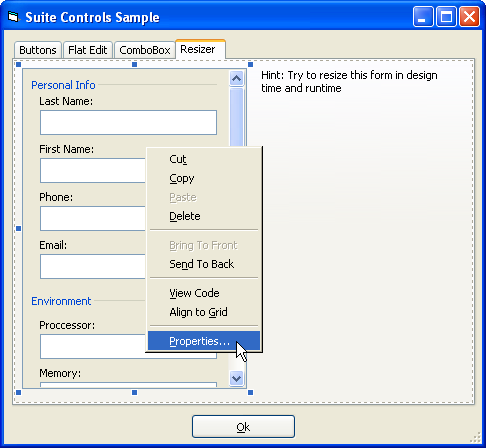
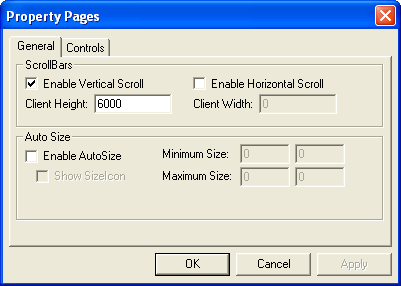
General Tab
The General tab allows you to: - Enable scrollbars - Set the height and width of the area to be scrolled - Enable auto size - Define the minimum and maximum size the Resizer can achieve - Specify whether the gripper icon is displayed in the lower right corner
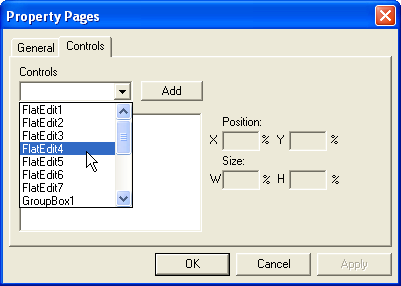
Controls Tab
The Controls tab allows you to specify which controls will automatically scale, resize, or reposition as the size of the Resizer control changes. For each control, you can define the percentage by which a control's size will grow, shrink, or reposition as the Resizer is resized.
The X and Y inputs are percentages. Some common configurations include:
- Size X = 100; Y = 0: This makes the control's width grow at the same rate as the width of the Resizer.
- Size X = 100; Y = 100: This makes both the width and height of the control grow at the same rate as the Resizer's dimensions.
- Position X = 50; Y = 100: This keeps the control centered horizontally within the Resizer.
See Also
Copyright (c) 1998-2024 Codejock Technologies. All rights reserved.