Transparent Property
Description
Determines if the background of a TabControlPage is visible in WinXP mode.
Property Type
Read-write property
Syntax (Visual Basic)
Public Property Transparent() As Boolean
Remarks
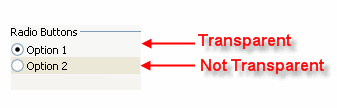
The Transparent property determines if the background of a TabControlPage is visible in WinXP mode. When True, the background of the control will be transparent when the control is placed on a TabControlPage and running on Windows XP or using a Windows XP skin.
Note: See notes below for restrictions on when the flatedit and pushbutton can use the Transparent property.
The picture below shows two option buttons that are on a TabControlPage in WinXP mode. The same applies for checkbox, groupbox, flatedit, pushbutton, and label controls.
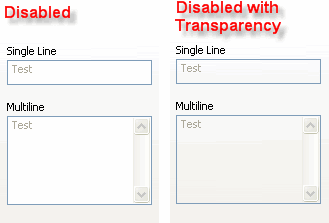
The only time a flatedit control can use transparency is if the control is in the disabled state and placed on a TabControlPage in WinXP mode.
The only time a pushbutton control can use transparency is if its FlatStyle property is True and placed on a TabControlPage in WinXP mode. Therefore, the only time Transparent is useful for a pushbutton is if you do not want transparency when the FlatStyle is used. This is because most button themes do not have transparent areas in them.
See Also
Copyright (c) 1998-2024 Codejock Technologies. All rights reserved.