EnableMarkup Property
Description
Allows the use of a XAML snippet to be used for the Caption of this control (Use for full page Markup).
Property Type
Read-write property
Syntax (Visual Basic)
Public Property EnableMarkup() As Boolean
Remarks
If set to True and a valid XAML snippet is set to the Caption of this control, then the Caption will be displayed as rendered XAML.
If set to False, then any text in the Caption, even if valid XAML, will get displayed in plain text.
The picture below shows many controls using snippets of XAML:
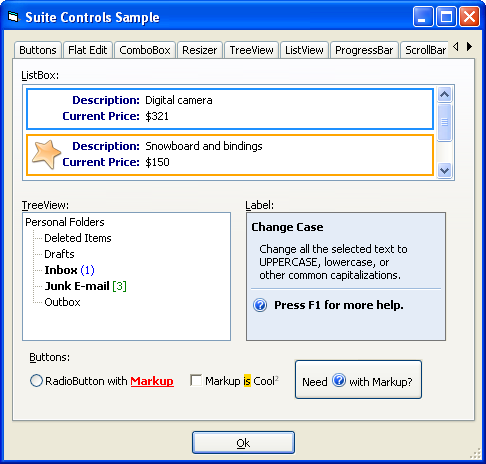
Use the MarkupContext to link events in XAML with Subroutines or Functions in your code.
The Label control is unique in that it can also be used to create full-screen XAML applications. It is possible to create elaborate full-sized applications using Markup. To do this, the Label control is used. For a full-sized application designed with Markup, you would add a Label control to a form and resize the Label control to the full size of the form. It is recommended to first add a Codejock Resizer control that is the size of the form and then drop the Label control inside the Resizer. Then you would set the Caption property of the Label control to the entire XAML string created using the MarkupPad.
You would then use the MarkupContext property of the Label control to connect events that occur in XAML Markup with Subroutines or Functions in your application.
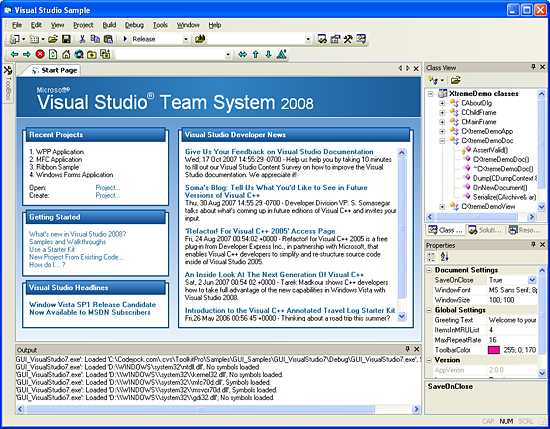
Below is a picture of a Label resized to the size of a form using nothing but XAML. The MDI Child of this application was created using XAML and the Label control. (The image has been scaled down to fit on this page):
See Also
Example
Copyright (c) 1998-2024 Codejock Technologies. All rights reserved.