UseVisualStyle Property
Description
Determines if the control is drawn using visual styles/SkinFramework, if supported.
Property Type
Read-write property
Syntax (Visual Basic)
Public Property UseVisualStyle() As Boolean
Remarks
Visual styles and SkinFramework skins are specifications for the appearance of controls. UseVisualStyle determines whether to use the currently set Windows XP visual style. If using SkinFramework, it determines whether to use the currently set style of the SkinFramework.
- If UseVisualStyle is True, the currently set Windows XP visual style will be used to theme the control. If using SkinFramework, the currently set style of the SkinFramework will be used to skin the control.
- If UseVisualStyle is False, the currently set appearance/style in the OS will be used.
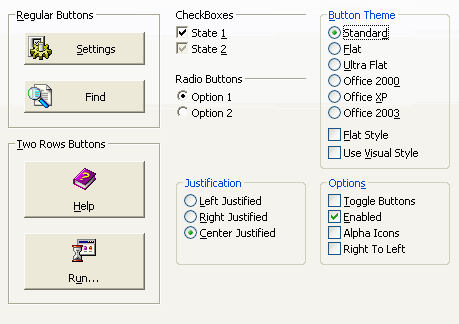
Controls running on Windows XP using the standard theme (in the picture, the standard theme is applied to the "Regular Buttons," "Two Row Buttons," "CheckBoxes," and "Radio Buttons" groups only; the other groups continue to use the current OS settings) and UseVisualStyle is False.
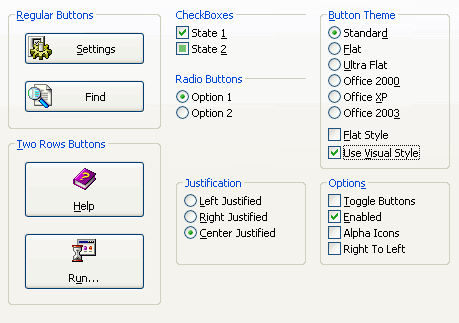
Controls running on Windows XP using the standard theme (in the picture, the standard theme is applied to the "Regular Buttons," "Two Row Buttons," "CheckBoxes," and "Radio Buttons" groups only; the other groups continue to use the current OS settings) and UseVisualStyle is True. Notice that even when the standard theme is selected, UseVisualStyle specifies to use the current OS style.
See Also
Copyright (c) 1998-2024 Codejock Technologies. All rights reserved.