Transparent Property
Description
Determines if the background of a TabControlPage is visible in WinXP mode.
Property Type
Read-write property
Syntax (Visual Basic)
Public Property Transparent() As Boolean
Remarks
The Transparent property determines if the background of a TabControlPage is visible in WinXP mode. When True, the background of the control will be transparent when the control is placed on a TabControlPage and running on Windows XP or using a Windows XP skin.
Note: See notes below for restrictions on when the flatedit and pushbutton can use the Transparent property.
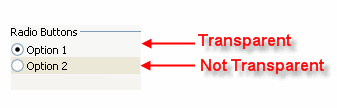
The picture below shows two option buttons that are on a TabControlPage in WinXP mode. The same applies for checkbox, groupbox, flatedit, pushbutton, and label controls.
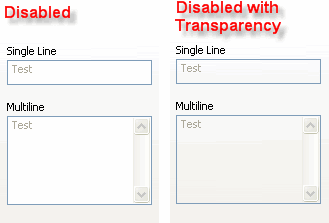
The only time a flatedit control can use transparency is if the control is in the disabled state and placed on a TabControlPage in WinXP mode.
The only time a pushbutton control can use transparency is if its FlatStyle property is True and placed on a TabControlPage in WinXP mode. Therefore, the only time Transparent is useful for a pushbutton is if you do not want transparency when the FlatStyle is used. This is because most button themes don't have transparent areas in them.
See Also
Copyright (c) 1998-2024 Codejock Technologies. All rights reserved.