Skin Framework ActiveX Controls v24.0

Skin Framework ActiveX Overview

Command Bars for ActiveX provides Windows developers with sophisticated Office style Command Bars and One Note style MDI tab windows. The framework fully supports menu and toolbar customization to give you more control over your application's workspace. Command Bars come with built-in theme support that allows you to choose from predefined themes such as Office XP, Office 2003, and Visual Studio .NET.
Docking Pane for ActiveX provides Windows developers with a sophisticated Visual Studio.NET™ style docking pane. Developers can easily create tear-off tabs and auto-hide windows that allow for a more manageable application workspace. The docking panes come with built-in theme support that allows you to choose from predefined themes such as Visio and Visual Studio .NET.
Property Grid for ActiveX provides Windows developers with a sophisticated Visual Studio.NET™ style property grid. Developers can easily create a hierarchical list of editable properties and represent many different data types or sub-items. The property grid comes with a built-in toolbar for easy sorting and grouping, and a help panel to display information on each selected item.
Grid Control allows you to display a hierarchical list of items similar to Outlook 2003 email inbox.
Suite Pro Controls provide many enhanced components such as hyperlink and multiple selection tree controls, browse edit, Office style color popups, Vista task dialog, and much more.
Calendar for ActiveX provides Windows developers with a sophisticated Office style Calendar.
Markup for ActiveX provides additional Markup Support for Controls.
Shortcut Bar for ActiveX provides developers with full theme support, giving their applications the closest, most exact Office style themes of any third-party tool available today.
Task Panel for ActiveX provides Windows developers with features similar to the Task Panels seen in Microsoft Office and Windows Explorer. You can easily manage your application shortcuts and have a unique way of displaying information to the end user.
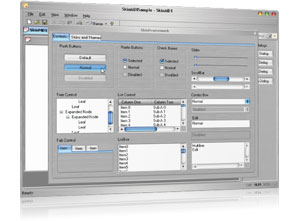
Skin Framework for ActiveX allows Windows developers to fully skin their applications, including components such as title bar, scroll bars, buttons, checkboxes, and option buttons.
Syntax Edit for ActiveX provides a Visual Studio .NET style Syntax Editor Control that offers advanced features such as text block grouping, syntax colorization, line numbers, font type, predefined color schemes, bookmarks, breakpoints, and many more advanced features.
Flow Graph ActiveX is a graphing control used to display relationship graphs, commonly used to display the relationships for a relational database.
Chart Pro ActiveX is an advanced chart library for Windows environment software development. The Chart ActiveX control brings the chart to virtually every development platform for Windows. The Chart Pro controls are easy to understand and can be implemented in only a few lines of code, but they also provide a rich set of classes for customization and enhancement.
Project Overview

| Control | Description |
|---|---|
| SkinFramework | Skin Framework control. |
| Class Module | Description |
|---|---|
| ColorManager | The ColorManager allows you to get the system colors for each display element of your application. Display elements are the parts of a window and the display that appear on the system display screen. Display elements are easily referenced by index. |
| SkinDescription | Object that describes a skin file. |
| SkinDescriptions | Object that contains a collection of skin files. |
| SkinFrameworkGlobalSettings | SkinFramework global settings, such as application name and resource file. |
| SkinIniFile | Object that holds the color, font size, and ini file name of each ini skin file. |
| SkinSchema | A resource object to be used by the skin framework. |
| SetWindowTheme | Method for setting the theme/skin of individual objects (buttons, frame, checkbox, etc.). |
| Enumeration | Description |
|---|---|
| SkinFrameworkApplyOptions | Flags that indicate which parts of the application will be skinned. |
| XTPColorManagerColor | Display element colors. |
| XTPCurrentSystemTheme | Enumeration used to determine the current Windows XP theme in use. |
Copyright (c) 1998-2024 Codejock Software. All rights reserved.
What do you think about this topic? Send feedback!