Verbs Property
See Also
PropertyGrid Control | PropertyGridVerb Object | Add Method

Description
The Verbs property is a collection of PropertyGridVerb objects that are displayed in the verb panel.
Property Type
Read-only property
Syntax (Visual Basic)
Public Property Verbs() As [PropertyGridVerbs](XtremePropertyGrid~PropertyGridVerbs.md)
Remarks
Verbs will be displayed in a separate panel just below the property grid. Verbs are links that can be used to perform actions in your application. When a verb is clicked, the VerbClick event occurs. If both the verb panel and help panel are visible at the same time, the verb panel is displayed above the help panel.
A PropertyGridVerb is a link similar to what is seen in Visual Studio .NET. For example, when the DataGrid control is selected at design time in VS .NET, an AutoFormat link button appears in the Properties window just below the property grid and above the help panel.
The verb panel is displayed when the first verb is added to the property grid's verb collection. To hide the verb panel, all verbs must be removed from the verb collection.
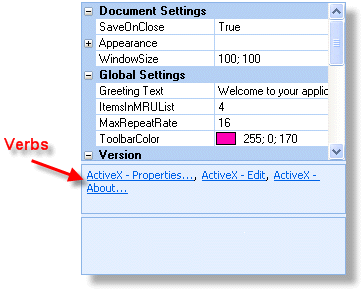
Example
Adding Verbs to the Property Grid (Visual Basic)
This sample illustrates how to add verbs to the property grid.
' Verb Ids
Const VERB_PROPERTIES = 100
Const VERB_EDIT = 101
Const VERB_ABOUT = 102

Private Sub Form_Load()
    ' Adds a verb to the property grid's verb collection. This will cause the verb
    ' panel to be displayed.
    wndPropertyGrid.Verbs.Add "ActiveX - Properties...", VERB_PROPERTIES
    wndPropertyGrid.Verbs.Add "ActiveX - Edit", VERB_EDIT
    wndPropertyGrid.Verbs.Add "ActiveX - About...", VERB_ABOUT

    ' Changes the caption of the first verb.
    wndPropertyGrid.Verbs(1).Caption = "ActiveX - Properties..."

    ' Set the height of the verb panel to 50 pixels
    wndPropertyGrid.VerbsHeight = 50
End Sub

' The VerbClick event occurs when a verb is clicked.
Private Sub wndPropertyGrid_VerbClick(ByVal Verb As XtremePropertyGrid.IPropertyGridVerb)
    ' Determines which verb was clicked
    Select Case Verb.Id
        ' Displays a message box if this verb was clicked.
        Case VERB_PROPERTIES:
            MsgBox "Xtreme Property Grid Properties", , "Verb Clicked - " & Verb.Caption
        Case VERB_EDIT:
            MsgBox "Xtreme Property Grid Edit", , "Verb Clicked - " & Verb.Caption
        Case VERB_ABOUT:
            MsgBox "Xtreme Property Grid" & vbCrLf & "Version " & App.Major & "." & App.Minor & "." & App.Revision, , "Verb Clicked - " & Verb.Caption
    End Select
End Sub
See Also
PropertyGrid Control | PropertyGridVerb Object | Add Method
Copyright (c) 1998-2024 Codejock Technologies. All rights reserved.