PropertyGridInplaceSliderControl Object
Description
Represents a slider control.
For a list of all members defined in this module, see PropertyGridInplaceSliderControl Members.
Remarks
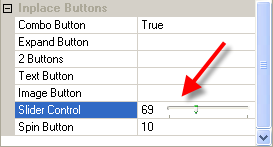
You can move the slider by dragging it, clicking the mouse to either side of the slider, or using the keyboard.
Slider controls are useful when you want to select a discrete value or a set of consecutive values in a range. For example, you could use a Slider to set the size of a displayed image by moving the slider to a given tick mark rather than by typing a number.
Use the AddSliderControl method of each item type to add the slider. The slider will automatically increment or decrement the value of the item it is added to.
Example
Set Item = Category.AddChildItem(PropertyItemNumber, "Slider Control", 10)

Dim SliderCtrl As PropertyGridInplaceSliderControl
Set SliderCtrl = Item.AddSliderControl
SliderCtrl.Max = 200
SliderCtrl.Min = 10
SliderCtrl.Width = 50
See Also
PropertyGridInplaceSliderControl Members
Copyright (c) 1998-2024 Codejock Technologies. All rights reserved.