TrackBlock Object
Description
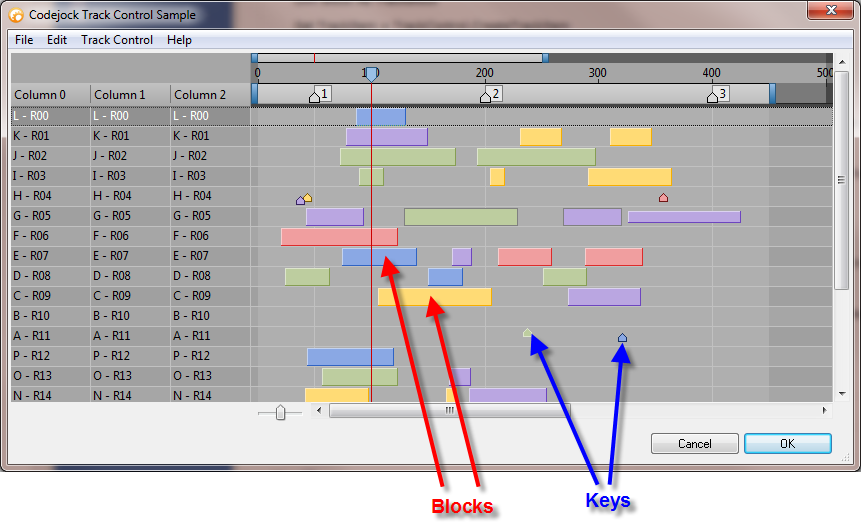
The TrackBlock object is used to represent both Blocks and Keys.
For a list of all members defined in this module, see TrackBlock Members.
Object Model



Remarks
Track Blocks are a visual representation of units of time in a track. They can have both a minimum and maximum time period. For example, a given block can represent 25 units of time, but can no less than 15 and no more than 30 units of time.
Dim TrackItem As TrackControlItem
Dim Block As TrackBlock

Set TrackItem = TrackControl.CreateTrackItem
Record.[AddItemEx](XtremeGridControl~GridRecord~AddItemEx.md) TrackItem

Set Block = TrackItem.[AddBlock](XtremeGridControl~TrackControlItem~AddBlock.md)(False, 15, 25)
Block.MinLength = 15
Block.MaxLength = 30
Block.Color = RGB(255, 219, 117)
The code above adds a block that represents 25 time units. It is placed within the track at 15 time units. Also note that the first parameter of AddBlock is False, which indicates we are adding a block as opposed to a key.
If AllowBlockScale is False, the block will not be able to be resized by the user, and MinLength and MaxLength will be ignored.
When AllowBlockRemove is True, blocks can be dragged from one track to a different track. When False, blocks can only be moved within the same track.
AllowBlockMove specifies whether the user can move blocks and keys. When False, keys and blocks can't be moved, but they can be resized/scaled. Use AllowBlockScale to restrict block resizing.
Blocks can also be different heights and set to different vertical alignments within the track. This is used just as a visual aid to make different blocks in the track visually different from each other.
Block.HeightPercent = 0.5
Block.VerticalAlignment = xtpTrackBlockCenter
The code above simply makes the block 50% the size of the track height and vertically aligns the block in the center of the track.
Keys are used simply as "notes" or reference points in the track. They can be added anywhere in the track to make note of some event at the given moment in time.
TrackItem.[AddBlock](XtremeGridControl~TrackControlItem~AddBlock.md)(True, 70, 0)
The code above will add a key at time unit 70; the last parameter, size, is ignored when adding keys. Note that the first parameter is True, which tells AddBlock to add a key as opposed to a block.
A block or key uses the Selected property to show when it is selected.
It is important to note that not all properties are used when the TrackBlock represents a Key. Properties not used by a key are HeightPercent, Length, MaxLength, and MinLength.
See Also
Copyright (c) 1998-2024 Codejock Technologies. All rights reserved.