MergeItems Method
Description
Merges 2 or more items in the grid.
Syntax
Public Sub MergeItems( _
    ByVal [RecordFrom](#) As Long, _
    ByVal [RecordTo](#) As Long, _
    ByVal [ColumnFrom](#) As Long, _
    ByVal [ColumnTo](#) As Long _
)
Parameters
- RecordFrom: Index of the record to start the merge. Will be the same as RecordTo if merging cells horizontally.
- RecordTo: Index of the record to end the merge. Will be the same as RecordFrom if merging cells horizontally.
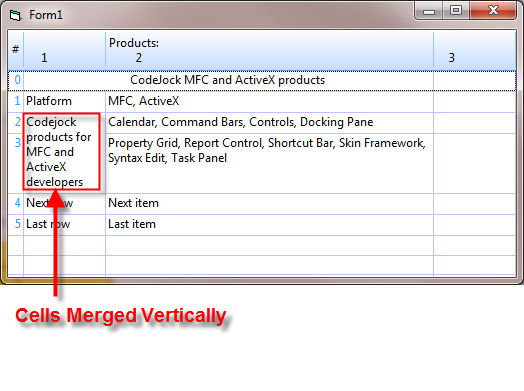
- ColumnFrom: Index of the column to start the merge. Will be the same as ColumnTo if merging cells vertically.
- ColumnTo: Index of the column to end the merge. Will be the same as ColumnFrom if merging cells vertically.
Remarks
MergeItems allows cells in the grid to be merged both vertically and horizontally.
Important information about merging:
- Merged cells support sorting and reordering.
- When merging, ONLY the data in the first merged cell is used.
- If a column is moved that contains a merged cell, then that merged cell will also display the same data that is displayed in the first merged cell.
- To clear all the merged cells, call
MergeItems(Null, Null, Null, Null). - Merged cells use the record index NOT the row index.
Example
Option Explicit

' Constants used to identify columns; this will be the column ItemIndex
Const COLUMN_SURVEY = 0
Const COLUMN_VS6 = 1
Const COLUMN_VS2005 = 2
Const COLUMN_VS2008 = 3
Const COLUMN_VS2010 = 4

Private Sub Form_Load()
    Dim Column As GridColumn

    Set Column = wndGridControl.Columns.Add(COLUMN_SURVEY, "A", 200, True)
    Column.Alignment = xtpAlignmentWordBreak

    Set Column = wndGridControl.Columns.Add(COLUMN_VS6, "B", 100, True)
    Set Column = wndGridControl.Columns.Add(COLUMN_VS2005, "C", 100, True)
    Set Column = wndGridControl.Columns.Add(COLUMN_VS2008, "D", 100, True)
    Set Column = wndGridControl.Columns.Add(COLUMN_VS2010, "E", 100, True)

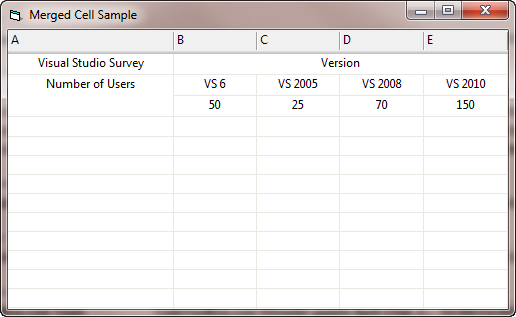
    AddData "Visual Studio Survey", "Version", "1", "2", "3"
    AddData "Number of Users", "VS 6", "VS 2005", "VS 2008", "VS 2010"
    AddData "", "50", "25", "70", "150"

    wndGridControl.Records.MergeItems 0, 0, COLUMN_VS6, COLUMN_VS2010
    wndGridControl.Records.MergeItems 1, 2, COLUMN_SURVEY, COLUMN_SURVEY

    ' Set other GridControl options
    wndGridControl.PaintManager.VerticalGridStyle = xtpGridSolid
    wndGridControl.PaintManager.HorizontalGridStyle = xtpGridSolid
    wndGridControl.AllowEdit = False
    wndGridControl.FocusSubItems = True
    wndGridControl.AllowColumnRemove = False
    wndGridControl.PaintManager.FixedRowHeight = False

    wndGridControl.PaintManager.DrawGridForEmptySpace = True

    wndGridControl.FocusSubItems = False
    wndGridControl.ShowRowFocus = False
    wndGridControl.PaintManager.HighlightForeColor = vbBlack
    wndGridControl.PaintManager.HighlightBackColor = vbWhite

    ' Apply changes
    wndGridControl.Populate
End Sub

Private Sub Form_Resize()
    ' Resize GridControl if a form is resized by user
    On Error Resume Next
    wndGridControl.Move 0, 0, ScaleWidth, ScaleHeight
End Sub

Private Sub mnuClose_Click()
    ' Close form and unload its contents
    Unload Me
End Sub

Sub AddData(survey As Variant, vs6 As Variant, vs2005 As Variant, vs2008 As Variant, vs2010 As Variant)
    Dim Record As GridRecord
    Dim Item As GridRecordItem

    Set Record = wndGridControl.Records.Add
    Set Item = Record.AddItem(survey)
    Item.Alignment = xtpAlignmentCenter
    Set Item = Record.AddItem(vs6)
    Item.Alignment = xtpAlignmentCenter
    Set Item = Record.AddItem(vs2005)
    Item.Alignment = xtpAlignmentCenter
    Set Item = Record.AddItem(vs2008)
    Item.Alignment = xtpAlignmentCenter
    Set Item = Record.AddItem(vs2010)
    Item.Alignment = xtpAlignmentCenter
End Sub
See Also
Copyright (c) 1998-2024 Codejock Technologies. All rights reserved.