FlowGraphConnectionPoint Object
Description
Represents a connection point for a node.
For a list of all members defined in this module, see FlowGraphConnectionPoint Members.
Object Model





Remarks
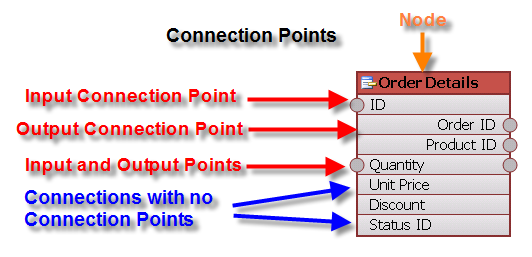
Connection points are added to a node and can have:
- No input points
- Only input points
- Only output points
- Both input and output points
Example
This sample adds a node and some connection points to the node:
Dim Page As FlowGraphPage
Set Page = FlowGraph.Pages.AddPage

Debug.Print FlowGraph.Pages.Count

Set FlowGraph.ActivePage = Page

Dim pTableCustomers As FlowGraphNode
Set pTableCustomers = Page.Nodes.AddNode

pTableCustomers.Caption = "Customers"
pTableCustomers.Tooltip = "Customers Table"
pTableCustomers.Color = RGB(155, 187, 89)
pTableCustomers.LocationX = 820
pTableCustomers.LocationY = 360
pTableCustomers.ImageIndex = 0
pTableCustomers.Locked = True

pTableCustomers.AddNamedConnectionPoints "ID", xtpFlowGraphPointInput
pTableCustomers.AddNamedConnectionPoints "Company", xtpFlowGraphPointNone
pTableCustomers.AddNamedConnectionPoints "Last Name", xtpFlowGraphPointNone
pTableCustomers.AddNamedConnectionPoints "First Name", xtpFlowGraphPointNone
pTableCustomers.AddNamedConnectionPoints "Job Title", xtpFlowGraphPointNone
pTableCustomers.AddNamedConnectionPoints "Business Phone", xtpFlowGraphPointNone
See Also
FlowGraphConnectionPoint Members
Copyright (c) 1998-2024 Codejock Technologies. All rights reserved.