DockingPaneEnableOptions Enumeration
Description
Flags that specify the extent a pane is enabled or disabled.
Members
| Member | Description |
|---|---|
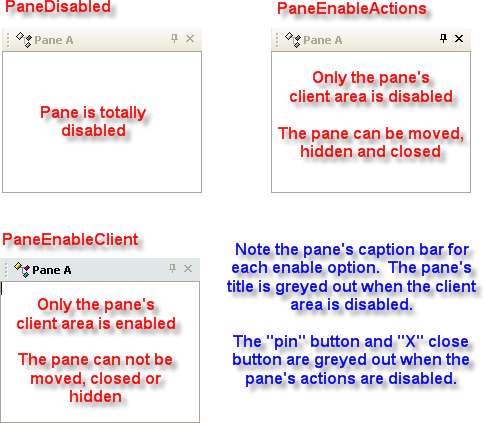
| PaneDisabled | Pane is totally disabled. The pane cannot be moved, hidden, or closed. The pane's client area is disabled. Note how the pane's title is grayed out indicating the client area is disabled and the "pin" and close "X" buttons are grayed out as well. |
| PaneEnableClient | Only the pane's client area is enabled. The pane cannot be moved, hidden, or closed. Note how the pane's title is grayed out indicating the client area is disabled. |
| PaneEnableActions | Only the pane's client area is disabled. The pane can be moved, hidden, and closed. Note how the pane's "pin" and close "X" buttons are grayed out indicating that pane actions are disabled. |
| PaneEnabled | Pane is completely enabled. The pane can be moved, hidden, and closed. The pane's client area is enabled. |
Remarks
The pane's Enabled property uses flags from the DockingPaneEnableOptions enumeration to specify the extent that a pane is enabled.
A pane can be: - Totally enabled - Only the client area enabled - Only pane actions enabled - Only client area disabled - Only pane actions disabled - Totally disabled
The Action event can further be used to restrict what a pane can do if actions are left enabled.
See Also
Copyright (c) 1998-2024 Codejock Technologies. All rights reserved.