ShowCaption Property
Description
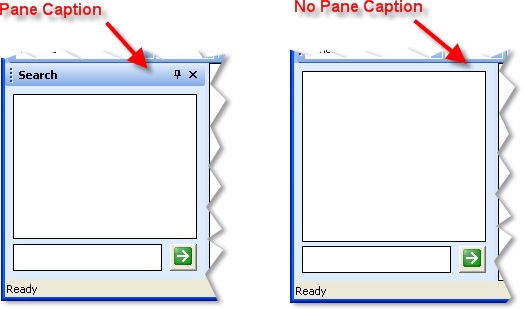
The ShowCaption property specifies whether the title bar (caption) of all docking panes will be visible.
Property Type
Read-write property
Syntax (Visual Basic)
Public Property ShowCaption() As Boolean
Remarks
-
If set to FALSE, the title bar will not be visible for all docking panes. If the caption is not visible for a pane, that pane cannot be moved (dragged) by the user. If the caption is hidden for an auto-hide pane, the user will have no way to dock the pane.
-
If set to TRUE, the caption for all panes is visible. The caption for individual panes can be hidden by setting the Pane.Options property to PaneNoCaption for each pane.
Example
Hide Pane Caption for All Panes (Visual Basic)
This sample illustrates how to hide the pane caption for all docking panes.
'Hides the caption for ALL docking panes.
DockingPaneManager.PaintManager.ShowCaption = False
Hide Caption for Individual Panes (Visual Basic)
This sample illustrates how to hide the caption of individual panes.
Const ID_PANE_SEARCH = 1

'Finds the pane with ID ID_PANE_SEARCH and hides its caption.
'All other panes will still display a caption.
DockingPaneManager.FindPane(ID_PANE_SEARCH).Options = PaneNoCaption
See Also
Copyright (c) 1998-2024 Codejock Technologies. All rights reserved.