CaptionFont Property
Description
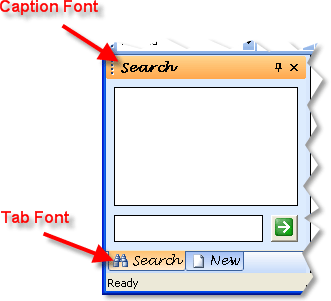
The CaptionFont property gets or sets the font used to display the text in the pane caption.
Property Type
Read-write property
Syntax (Visual Basic)
Public Property CaptionFont() As Font
Remarks
The CaptionFont property only affects the font in the pane caption. The font of the tab buttons can be changed with the DockingPane.TabPaintManager.Font property, and the font for the auto-hide tab buttons can be changed with the DockingPane.PanelPaintManager.Font property.
Example
Pane Caption Font Sample (Visual Basic)
This sample illustrates how to change the font for the pane caption and buttons.
Dim CaptionFont As StdFont

' Create a new font
Set CaptionFont = New StdFont
CaptionFont.Name = "Lucida Handwriting"
CaptionFont.Size = 10
CaptionFont.Bold = True

' Sets the font for the pane caption
Set DockingPaneManager.PaintManager.CaptionFont = CaptionFont

' Sets the font for the tab buttons when not hidden.
Set DockingPaneManager.TabPaintManager.Font = CaptionFont

' Sets the font for the tab buttons when hidden.
Set DockingPaneManager.PanelPaintManager.Font = CaptionFont
See Also
Copyright (c) 1998-2024 Codejock Technologies. All rights reserved.