DockSidePane Method
Description
Docks a pane to an inside edge of the client area when side docking is enabled.
Syntax
Public Sub DockSidePane( _
    ByVal [Pane](#) As [Pane](XtremeDockingPane~Pane.md), _
    ByVal [Offset](#) As Integer, _
    ByVal [Direction](#) As [DockingDirection](XtremeDockingPane~Enumerations~DockingDirection_EN.md) _
)
Parameters
-
Pane
Reference to the pane to dock. -
Offset
Number of pixels to offset the pane from the inside top edge of the client area. This only has an effect when using the DockLeftOf and DockRightOf directions. -
Direction
Edge of the client the pane will dock to. The possible values are:
| Value | Description |
|---|---|
| DockLeftOf | Docks a pane to the left of an existing pane. |
| DockRightOf | Docks a pane to the right of an existing pane. |
| DockTopOf | Docks a pane to the top of an existing pane. |
| DockBottomOf | Docks a pane to the bottom of an existing pane. |
Remarks
DockSidePane will dock a pane to the inside edge of the client using code. SideDocking must be enabled for DockSidePane to have any effect.
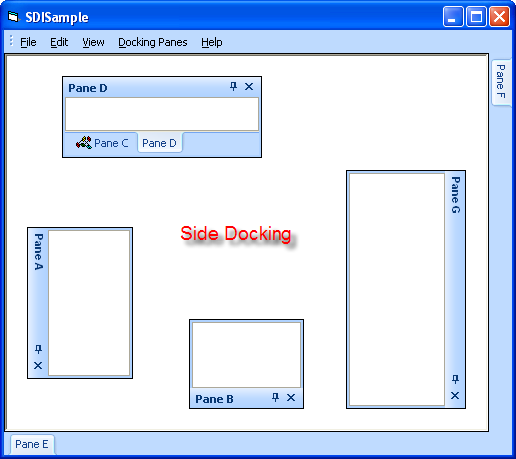
SideDocking enables or disables "Visio" style client edge docking. Side docking can only occur to the inside edges of the client area. When SideDocking is enabled, any pane that is dragged to an inside edge of the client area will attempt to "snap" to that inside edge. The pane will "snap" to the inside edge of the client and will leave a margin equal to that specified by SetSideDockingMargin.
SideDocking does not affect normal docking of panes. You will need to drag the pane past the side docking margin for normal docking algorithms to be used.
The picture below shows panes side docked to all edges of the client. The side docking margin in the picture is 23 pixels.
See Also
Copyright (c) 1998-2024 Codejock Technologies. All rights reserved.