ShowImage Method
Description
Specifies whether to display images in the tooltip window.
Syntax
Public Sub ShowImage( _
    ByVal ShowImage As Boolean, _
    ByVal ImageBase As Long _
)
Parameters
- ShowImage: True to display images in the tooltip window, False to hide images in tooltip windows.
- ImageBase: This is the offset to add to a commandbar control ID to specify a large image. Set to 0 to display only standard button icons associated with the control.
Remarks
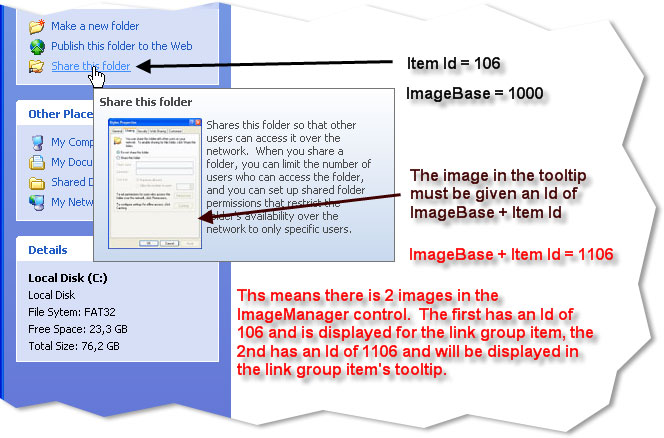
To add an image to a tooltip, as seen in the Office 2007 style tooltip, which usually features a large image that is a shrunken screenshot of the dialog/function a menu item or button performs, you would simply add another image to the imagemanager that has the same ID as the button/menu item plus the ImageBase value. When the ShowImage parameter is True and the ImageBase is greater than 0, it will automatically add the ImageBase to all control IDs when displaying the picture in the tooltips.
The diagram below illustrates how to display an image in the tooltip for a button control. The ImageBase is set to a value of 1000; you can choose any positive non-zero number for this. Note that there are 2 images in the ImageManager control: one for the button control, which has an ID of 106, and the second for the tooltip, which has an ID of ImageBase + Control ID. If you set the ImageBase to 0, then the button control image will also be displayed in the tooltip.
See Also
Copyright (c) 1998-2024 Codejock Technologies. All rights reserved.