SetPadding Method
Description
Sets the padding placed around the Text of a pane in pixels.
Syntax
Public Sub SetPadding( _
    ByVal [Left](#) As Long, _
    ByVal [Top](#) As Long, _
    ByVal [Right](#) As Long, _
    ByVal [Bottom](#) As Long _
)
Parameters
- Left: Padding placed on the left side of the Text of a pane.
- Top: Padding placed on the top of the Text of a pane.
- Right: Padding placed on the right side of the Text of a pane.
- Bottom: Padding placed on the bottom of the Text of a pane.
Remarks
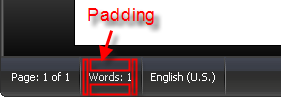
SetPadding will set the padding placed around the Text of a pane in pixels. Note that the Width of the pane will be adjusted to accommodate larger padding sizes if the padding exceeds the currently set Width. The height of the status bar will not get adjusted automatically. To adjust the status bar height, the MinHeight property must be used.
Note in the picture below the MinHeight of the status bar was enlarged to make it easier to see how padding can be used.
See Also
Copyright (c) 1998-2024 Codejock Technologies. All rights reserved.