InsertGroup Method
Description
Adds a RibbonGroup to a RibbonTab at a specific location.
Syntax
Public Function InsertGroup( _
    ByVal [Index](#) As Long, _
    ByVal [Caption](#) As String, _
    ByVal [Id](#) As Long _
) As [RibbonGroup](XtremeCommandBars~RibbonGroup.md)
Parameters
- Index: Position within the tab's Groups Collection to insert the new RibbonGroup.
- Caption: Text to display in the group title bar. This is the group's caption.
- Id: Group Id.
Return Type
Reference to the RibbonGroup object added to the RibbonTab Groups Collection.
Remarks
InsertGroup adds a group at a specific location within the tab's Groups Collection. Groups will be displayed in the order they are added. This means the group with an Index of zero (0) will be displayed first to the far left, then to the immediate right will be the group with an Index of one (1), etc.
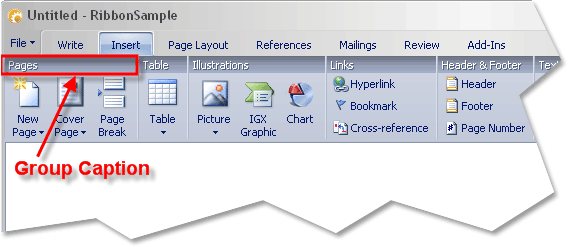
Tabs in the Ribbon Bar contain one or more RibbonGroup objects. Buttons, Popups, etc., can then be added to the groups. In the picture above, the "Pages", "Table", "Illustrations", and "Links" are all RibbonGroup objects that have been added to the "Insert" RibbonTab.
See Also
- RibbonGroups Collection
- Caption Property
- RibbonGroups Object
- AddGroup Method
- RibbonTab Groups Collection
- Id Property
- RemoveAll Method
- RemoveGroup Method
Copyright (c) 1998-2024 Codejock Technologies. All rights reserved.